Material
Materials have the following property items.
Material configuration file import/export is also possible.
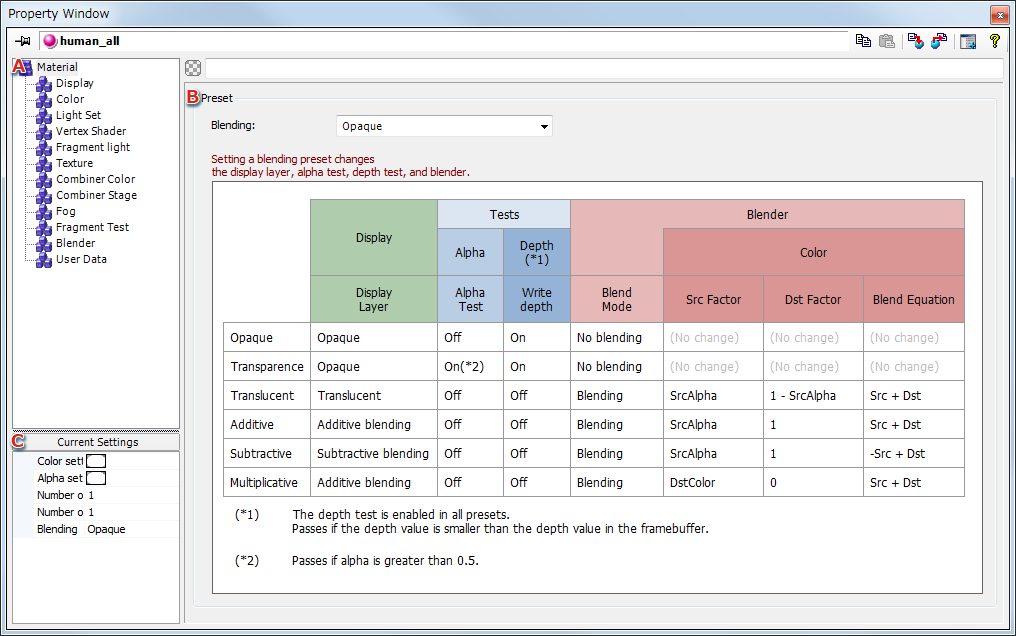
- Displays material properties.
When an item is selected, information for that item is displayed in B, where it can be edited.
- Displays details of the selected property item.
The blending preset can be selected from a pull-down menu.
- Displays current material settings.
Blending Preset
You can set a blending preset.
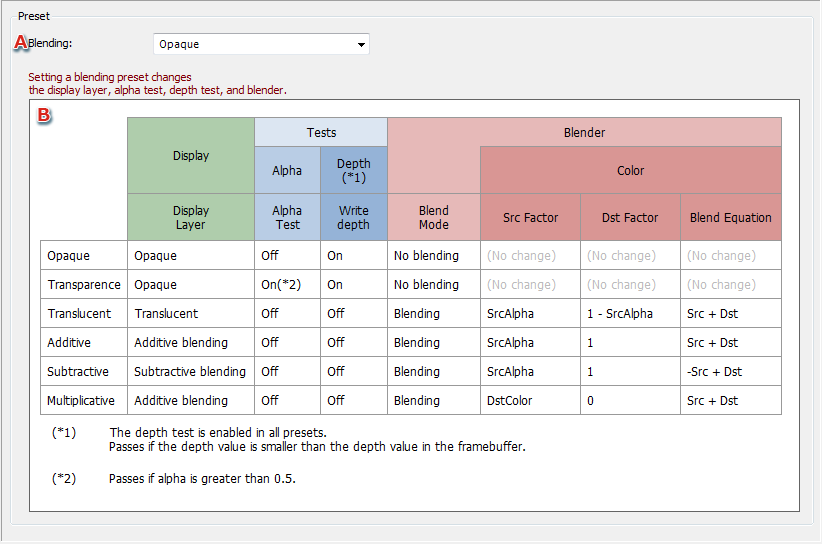
- Select a blending preset from the pull-down menu.
Custom can be selected if preset settings are inapproriate.
- This table gives details on blending preset settings.
Importing/Exporting Material Configuration Files
This feature is for importing/exporting material configuration files.

- Used to imports material configuration files (.c3mt).
Clicking the icon opens a file selection window in a separate window, where you can select the material configuration file.
Files can also be imported by dragging and dropping them into the material Property window.
- Used to exports material configuration files.
Clicking the icon opens a material configuration file export dialog in a separate window.
Material Configuration File Selection Window
This window opens when selecting a material configuration file for import.

- Displays the material configuration files (the
.c3mt files) that can be selected.
When you select a file, the dialog for importing the Material Settings file opens and you can configure the details there.
Dialog for importing the Material Settings file
Select the checkboxes for items to be imported and press OK.

- Set which items to import from the Material Settings file by marking their checkboxes.
The items selected here will be the applied items when importing.
- Setting details
Displays details regarding the material settings being imported.
- Pressing the + icon expands all items displayed under setting details.
Pressing the - icon closes all expanded settings.
- Comments
Shows comments for the Material Settings file being imported.
Material Configuration File Export Dialog
This dialog can be used to confirm information about material configuration files to be exported and set applicable default settings.

- Applicable default settings at time of import
Selected items are applied as defaults at time of import.
All settings get exported, regardless of whether they are selected.
- Setting details
Displays details regarding material settings being exported.
- Pressing the + icon expands all items displayed under setting details.
Pressing the - icon closes all expanded settings.
- Comment
Attaches a comment to the material configuration file to be exported.
Pressing OK opens a save file dialog. You can save the material configuration file (.c3mt) in any location under any name.
CONFIDENTIAL