Blender
You can make blend setting for materials here.
The setting items shown vary depending on the selected blend mode.
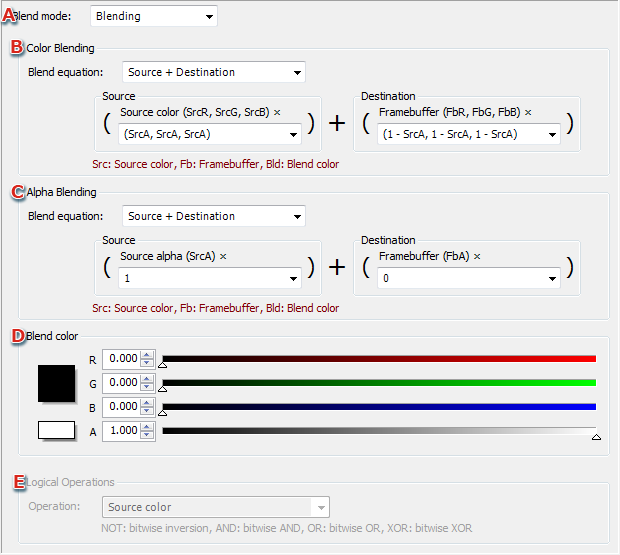
- Blend mode
Select the blend mode to be used by the material from the pull-down menu.
- Color blend
This setting appears if blending is selected under A.
Select the blend method for the color from the pull-down menu and set formula components (for both source and destination).
- Alpha blend
This setting appears if blending is selected under A.
Select the blend method for the alpha from the pull-down menu and set formula components (for both source and destination).
- Blend color
This setting appears if blending is selected under A.
The blend color and alpha to be used in blending can be set using direct numeric input, the color sliders, or on the Color Picker dialog. Clicking the color picker opens the Color Picker dialog.
- Logical Operations
Sets the operation from the pull-down menu if Logical Operations has been selected for the blend mode under A.
CONFIDENTIAL