Fragment Test
You can make alpha test, depth test, and stencil test settings here.
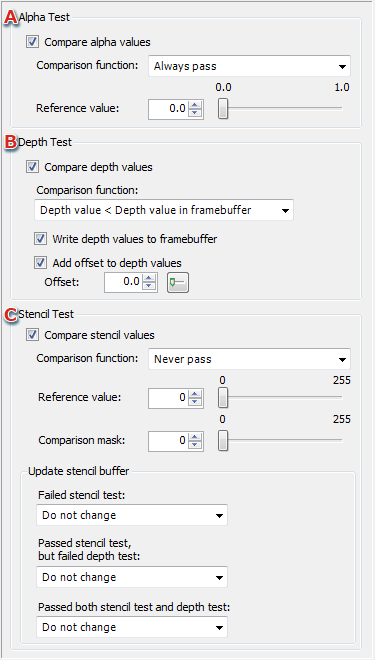
- Enables/disables the alpha test using the checkbox.
You can set alpha test comparison conditions and reference values.
- Enables/disables the depth test using the checkbox.
You can set the process to use for depth test comparison conditions and depth values.
- Enables/disables the stencil test using the checkbox.
You can set items such as stencil test comparison conditions and reference values.
You can set the process for updating the stencil buffer according to test results.
Alpha test

- The alpha test is enabled when this item is selected for comparing alpha values.
- Select the alpha value comparison conditions from the pull-down menu.
- This item can be set by directly entering a numeric value for the reference value or using the slider.
Depth test
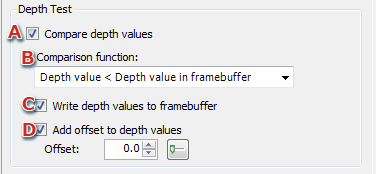
- The depth test is enabled when this item is selected for comparing depth values.
- Select the depth value comparison conditions from the pull-down menu.
- Select this item when writing compared depth values to the frame buffer.
- Select this item when applying an offset to depth values.
This item can be set by directly entering a numeric value for the offset to be applied or using the slider window.
Stencil test

- The stencil test is enabled when this item is selected for comparing stencil values.
- Select the stencil value comparison conditions from the pull-down menu.
- This item can be set by directly entering a numeric value for the reference value or using the slider.
- This item can be set by directly entering a numeric value for the comparison mask or by using the slider.
- Select the stencil buffer update method from the pull-down menu based on stencil test results.
CONFIDENTIAL