The figure below shows the update sequence. Although this sequence is executed repeatedly, the repetitive processes can be eliminated depending on changes in the scene.
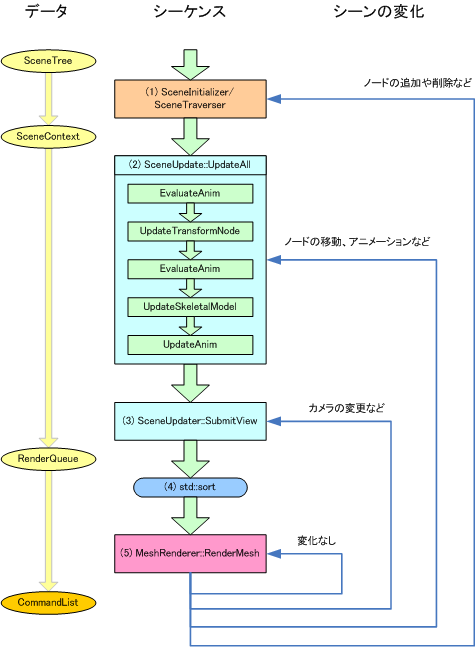
The figure below shows the update sequence. Although this sequence is executed repeatedly, the repetitive processes can be eliminated depending on changes in the scene.
SceneInitializer executes initialization processes, such as material ID calculation, for each node in the SceneTree. 初期化には SceneInitializer::Begin, SceneInitializer::End, and SceneNode::Accept are used.
SceneTraverser traverses the SceneTree (the hierarchical structure for SceneNode), serializes each SceneNode, and outputs the result to SceneContext. SceneTraverser::Begin, SceneTraverser::End and SceneNode::Accept are used to traverse a scene.
A scene must be initialized and traversed again if there is a change in the SceneTree structure such as due to adding a node (AttachChild) or deleting one (DetachChild).
Execute demo::SceneSystem::InitializeScene in the demo library.
SceneUpdater::UpdateAll updates positional information according to the coordinate system (UpdateTransformNode) and updates deform information (UpdateSkeletalModel) for the SceneNode registered in SceneContext. It also updates animation (EvaluateAnim and UpdateAnim). Calling UpdateAll will execute all of these processes at once. However, they may also be called individually as required.
This process must be executed in order to apply node translations and/or animations.
Execute demo::SceneSystem::UpdateScene in the demo library.
SceneUpdater::SubmitView updates information dependent on the view coordinate system. Next, create a key for sorting meshes (ResMesh) and register meshes (EnqueueMesh) in RenderQueue. RenderQueue will now include the RenderElement list structure.
The key used for sorting is created using BasicRenderKeyFactory and its derived classes.
This process is executed when the View coordinate system has been changed. Execute Camera::UpdateCameraMatrix to apply camera movements and changes by the view updater or projection updater to the view coordinate system.
This process should be re-executed in cases such as when the view updater is changed or the camera is switched. However, if the camera moves, take care that movement of the camera is not reflected unless nodes are moved by executing UpdateAll in (2).
Execute demo::RenderSystem::SubmitView in the demo library.
Render targets registered in RenderQueue will be arranged based on sort keys. Execute demo::RenderSystem::SubmitView in the demo library in conjunction with SubmitView in the previous section.
MeshRenderer::RenderMesh creates a command for rendering meshes. This results in generation of CommandList which is executed by the GPU to carry out rendering.
Commands for rendering meshes are created by executing demo::RenderSystem::RenderScene and demo::RenderSystem::RenderStereoScene in the demo library. Command list management and execution is carried out by demo::CommandListSwapper.
CONFIDENTIAL