Mesh Rendering Order
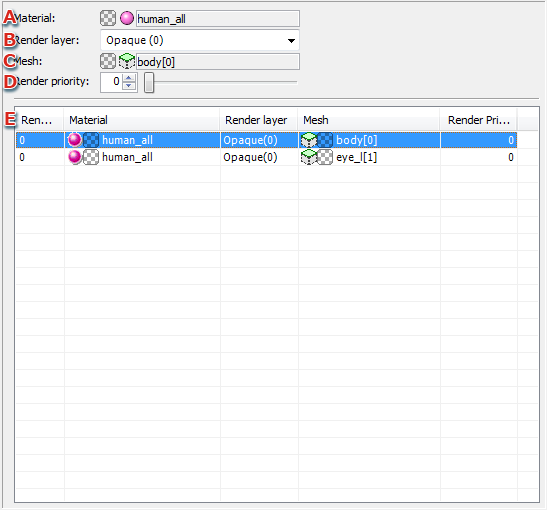
- Selecting a mesh displayed in the Render Priority List displays the material name that uses that mesh.
- Render layer
The render layer can be changed by selecting from among Opaque, Translucent, Subtractive blending, and Additive blending.
- Mesh
Displays the selected mesh name.
- Render Priority
Sets a render priority from 0 to 15.
Basically, the higher the numeric value for render priority, the more a mesh appears in the foreground compared to meshes with lower numeric values.
- Mesh Render Priority List
Displays the render priority of meshes in a list. This list includes the following items.
- Rendering order
Displays the mesh rendering order as a number.
- Material
The material name using the mesh is displayed.
Double-clicking a material name opens the Property Window for materials
- Render layer
Displays the render layer being used.
- Mesh
Displays the mesh name.
Double-clicking a material name opens the Property Window for materials
- Render Priority
Displays the render priority of meshes.
CONFIDENTIAL