Fragment lighting Properties panel
The fragment lighting Properties panel is used to edit fragment lights created using CreativeStudio.
The following three types of fragment lighting can be selected.
- Directional light
- Point Light
- Spot Light
Fragment Lighting Category Settings and Features
This page describes fragment lighting category settings and features.

-
Categories
Allows you to show/hide settings used in the fragment lighting category.
-
General
Allows you to specify the type of fragment lighting and the lookup table set to use.
-
Ambient color
Allows you to set the ambient color for the fragment light.
-
Diffuse Color
Allows you to set the diffuse color for the fragment light.
-
Specular 0
Allows you to set the Specular 0 color for the fragment light.
-
Specular 1
Allows you to set the Specular 1 color for the fragment light.
-
Position
Allows you to set the position of the fragment light in terms of X, Y and Z.
-
Direction:
Sets the light direction.
Rotation of the parent node is inherited (under construction). -
Distance attenuation
This option is enabled when the type of light is Point light or Spotlight.
Using Distance attenuation allows you to set the distance between the model and light.The Distance attenuation and Angular attenuation settings are turned off by default. Be sure to select the appropriate checkboxes when using these features.
-
Angular attenuation
This option is enabled when the type of light is Spotlight.
Using Angular attenuation allows you to set the angle between the model and light.
Distance attenuation
Distance attenuation can be set when the light type is a Point light or Spotlight.
A lookup table can also be used to make settings and/or edits.
If Enable (checkbox) is not selected, be sure to check it when setting Distance attenuation.

When using a lookup table, you must first create a lookup table set and select the lookup table set to use under General settings.

For details on lookup table sets, click Here.
Angular attenuation
Angular attenuation can be set when the light type is Spotlight.
A lookup table can also be used to make settings and/or edits.
For Angular attenuation as well, you must select Enable (checkbox) located in the Distance attenuation section.
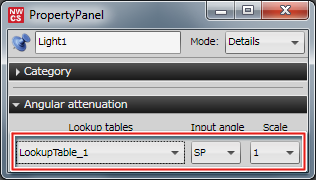
As with Distance attenuation, when using a lookup table, you must first select a lookup table set in the General category.
For details on lookup table sets, click Here.
Input angle
The input values used in lookup tables are called input angles because angles are used.
For details on the types of input angle, click here.
Scale
Here, the scale setting applied to lookup table output relates to light intensity.
The larger the scale, the stronger the light. The smaller the scale, the weaker the light.