Display
Performs display-related settings.
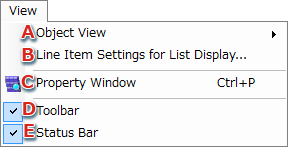
- Displays the Object View submenu.
- Sets the column items for the List View for each object.
The Column Item Settings dialog appears.
- Opens the property window for the selected object.
- Toggles display of the toolbar.
- Toggles display of the status bar.
Performs operations related to the object view display.
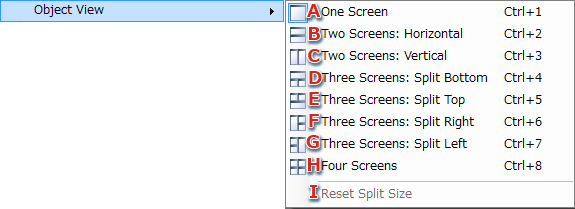
- Sets the object view to a single screen layout.
- Sets the object view to a double screen layout. (upper/lower)
- Sets the object view to a double screen layout. (left/right)
- Sets the object view to a triple screen layout. (split bottom)
- Sets the object view to a triple screen layout. (split top)
- Sets the object view to a triple screen layout. (split right)
- Sets the object view to a triple screen layout. (split left)
- Sets the object view to a quad screen layout.
- Resets the object view split size to the default state.
Valid only for layouts with two or more screens.
Column Item Settings dialog
Sets the column items for the List View for each object.

- Selects the List View to be configured.
- The column items are displayed in current order from top to bottom.
Check the headers to be displayed.
- Shifts the selected header up.
- Shifts the selected header down.
- Restores the order and display of column items to the default settings.
CONFIDENTIAL