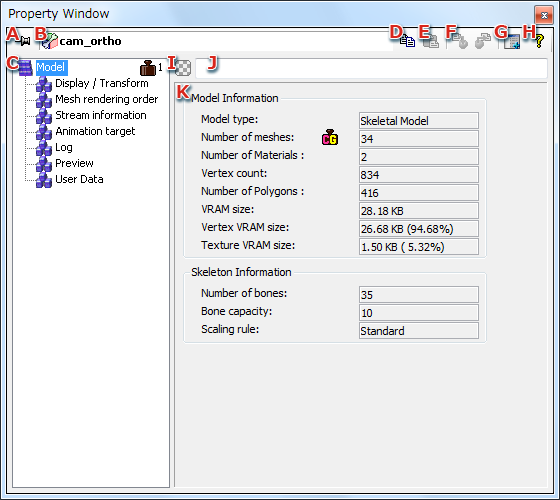
The properties of the selected object are displayed in the Property Window.
This window is used for editing the properties.
The information displayed in the Property Window will vary, depending on the kind of object that has been selected.
Optimization hints are displayed if there is a possibility of optimizing property settings.
When the target object is fixed, the target object does not change even if the selected object changes.
When multiple objects are selected, the names of objects in focus and the number of selected objects of the same type are displayed.
When a property item is selected, the details of the selected item are displayed on the right side of the dialog box.
The composition of the property items will depend on the target object's type. You can copy and paste properties by opening the right click menu.
If the property item has child items, all settings are copied, including the child items.
Select the root directory to copy all settings of the object.
To paste, same items as the copied property items must be selected.
This operation is valid only when a material has been selected.
For details, see the Material Property Panel.
There are no restrictions on the number of windows that can be displayed.
Using this feature, the following operations are possible.
The task color is saved in the intermediate file, but it is not reflected in the binary resource.
Use this to classify objects when working with 3DEditor.
Task comments are saved in the intermediate file, but are not reflected in the binary resource.
Use this to make explanatory remarks about objects when working with 3DEditor.
Properties are edited in this view.
Optimization hints is a feature for notifying the user about property settings that can possibly be optimized.
An optimization hint is displayed if you hover the cursor over the Optimization Comment icon.
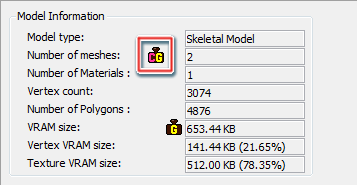
You can disable a hint as having been confirmed by right clicking that hint.
You can enable/disable hints and set a threshold for hints in the config file.
| Property/ Category |
Optimization hint conditions | Config elements |
|---|---|---|
| Model/ Model |
If the number of polygons in a model exceeds the threshold value | <Enable_Model_PolygonCount> <Threshold_Model_PolygonCount> |
| If the number of vertices in a model exceeds the threshold value | <Enable_Model_VertexCount> <Threshold_Model_VertexCount> |
|
| If the number of meshes in a model exceeds the threshold value | <Enable_Model_MeshCount> <Threshold_Model_MeshCount> |
|
| If the number of materials in a model exceeds the threshold value | <Enable_Model_MaterialCount> <Threshold_Model_MaterialCount> |
|
| If the number of bones in a model exceeds the threshold value | <Enable_Model_BoneCount> <Threshold_Model_BoneCount> |
|
| If the VRAM size of a model exceeds the threshold value | <Enable_Model_VramSize> <Threshold_Model_VramSize> |
|
| If the vertex VRAM size of a model exceeds the threshold value | <Enable_Model_VertexVramSize> <Threshold_Model_VertexVramSize> |
|
| If the texture VRAM size of a model exceeds the threshold value | <Enable_Model_TextureVramSize> <Threshold_Model_TextureVramSize> |
|
| If the number of meshes in a model exceeds the number of materials | <Enable_Model_MeshMaterialCount> | |
| Mesh / Mesh |
If the number of polygons in a mesh exceeds the threshold value | <Enable_Mesh_PolygonCount> <Threshold_Mesh_PolygonCount> |
| If the number of vertices in a mesh exceeds the threshold value | <Enable_Mesh_VertexCount> <Threshold_Mesh_VertexCount> |
|
| If the VRAM size of a mesh exceeds the threshold value | <Enable_Mesh_VramSize> <Threshold_Mesh_VramSize> |
|
| If a stream other than BoneIndex or BoneWeight of a mesh has been quantized | <Enable_Mesh_NotBoneStreamQuantization> | |
| If the number of bones influenced by a mesh vertex exceeds two | <Enable_Mesh_Bone3_4> | |
| Material/ Display |
If Display both faces is set for the material | <Enable_Material_Display_CullingModeNever> |
| Material/ Vertex shader |
If vertex lighting of a material is enabled | <Enable_Material_VertexShader_VertexLighting> |
| If vertex shader output is not used by the combiner stage even though vertex lighting for the material is enabled | <Enable_Material_VertexShader_ NotUseVertexColor_EnableVertexLighting> |
|
| If vertex shader output is not used by the combiner stage even though hemispherical lighting for the material is enabled | <Enable_Material_VertexShader_ NotUseVertexColor_EnableHemisphereLighting> |
|
| Material/ Fragment Lighting |
If the primary or secondary color is not used by the combiner stage even though fragment lighting of the material is enabled | <Enable_Material_FragmentLighting_ NotUsePrimarySecondaryColor_EnableFragmentLighting> |
| If the layer config of the material is between 4 to 7 | <Enable_Material_FragmentLighting_LayerConfig4_7> | |
| Material/ Texture |
If the number of textures applied to a material exceeds the threshold | <Enable_Material_Texture_Count> <Threshold_Material_Texture_Count> |
| If linear interpolation between mipmap levels of a material is enabled | <Enable_Material_Texture_MipmapLinear_0> <Enable_Material_Texture_MipmapLinear_1> <Enable_Material_Texture_MipmapLinear_2> <Enable_Material_Texture_MipmapLinear_3> |
|
| If the coordinators for texture 2 and 3 of a material are not Coord0 and Coord1 | <Enable_Material_Texture_T2T3_NotUseC0C1_2> <Enable_Material_Texture_T2T3_NotUseC0C1_3> |
|
| If a material includes a texture not used by the combiner stage or in bumpmapping | <Enable_Material_Texture_NotUse_0> <Enable_Material_Texture_NotUse_1> <Enable_Material_Texture_NotUse_2> <Enable_Material_Texture_NotUse_3> |
|
| Texture/ Texture |
If the VRAM size of a texture exceeds the threshold value | <Enable_Texture_Texture_VramSize> <Threshold_Texture_Texture_VramSize> |
| If the format of a texture is not ETC | <Enable_Texture_Texture_NotETC> | |
| If the format of a texture is L4 or A4 | <Enable_Texture_Texture_L4_A4> | |
| If the size of a texture exceeds the size of the secondary cache | <Enable_Texture_Texture_ETC_Over16384> <Enable_Texture_Texture_NotETC_Over2048> |
|
| If the texture does not have a mipmap | <Enable_Texture_Texture_NotMipmap> | |
| If the texture mipmap is not maximum level | <Enable_Texture_Texture_MipmapNotLeastestSize> |
CONFIDENTIAL