- Create the shader binary using and UserShader and Register Allocations for reference.
To read about creating the shader binary see VertexShaderReferenceManual.pdf.
- Create a shader intermediate file from the created shader binary in CreativeStudio.
Select Create > Expert > User shader to open the Shader Creation panel.
The item settings for this shader intermediate file are described below.
Note: Parts surrounding in red in the figure, represent where the UserShader sample has changed.
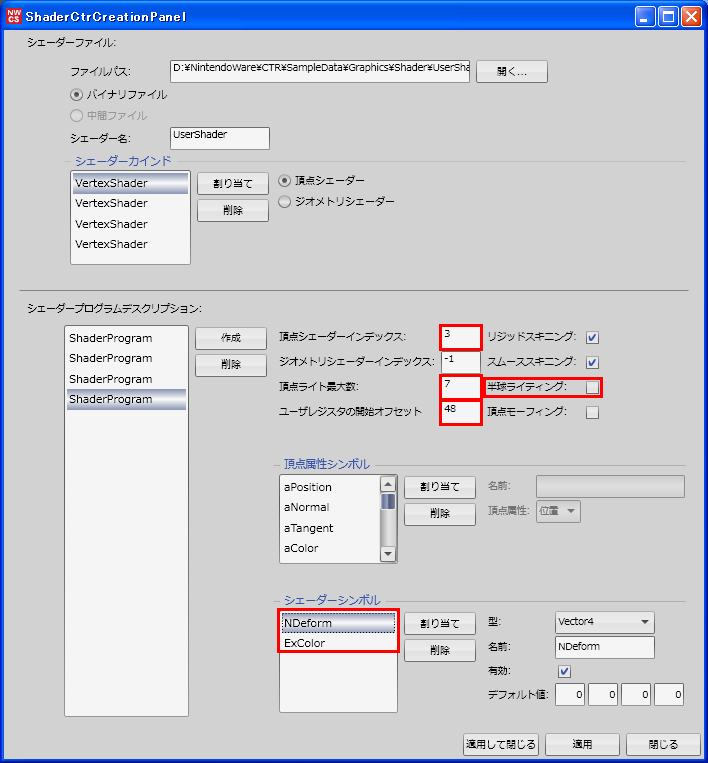
- Vertex shader index
Specifies the vertex shader index contained in the shader binary.
At this time, the kind must be assigned in the order shaders were linked when generating shader binary.
The example in the figure includes the following four vertex shaders: gfx_UserShader0.vsh, gfx_UserShader1.vsh, gfx_UserShader2.vsh, and gfx_UserShader3.vsh. Create a description by specifying each individual index number, 0, 1, 2 or 3. - Geometry shader index
Specifies the geometry shader index contained in the shader binary.
What's specified here is the index number of the geometry shader assigned by Shader types.
- Maximum number of vertex lights
Specifies the maximum number of vertex lights that the shader supports.
If you are not using vertex lights, set this value to 0.
Up to 9 vertex lights (54 registers) can be set.
- Starting offset for user registers
Specifies the starting offset for user registers.
What is specified is the first register in the universal registers which will be used as user registers.
The value can be set between 1 and 60, depending on the number of bones and vertex lights.
You must set the same value asnw_user_register_startinShaderConfig.h.
- Rigid skinning
Enable this when rigid skinning is supported.
- Smooth skinning
Enable this when smooth skinning is supported.
- Hemispherical lighting
Enable this when hemispherical lighting is supported.
Disable this when the register used for hemispherical lighting is to be used for a different purpose.
- Vertex morphing
Enable this when vertex morphing is supported.
At the present time this is not supported.
- Vertex shader index
- Assign the created shader intermediate file to a mesh.
Select a shader category and apply the the created shader and program index.
When using UserShader, the shader corresponding to the index number given above can be applied by specifing a value of 0 through 3 for the program index.
- Specify shader parameters to the newly added register.
With UserShader, NDeform and ExColor are added as Vector 4.
Under texture combiner settings, select "Vertex shader output result" for the source in order to apply color addition according to the ExColor parameter.
