Unlike standard rendering, commands are re-used with stereo rendering.
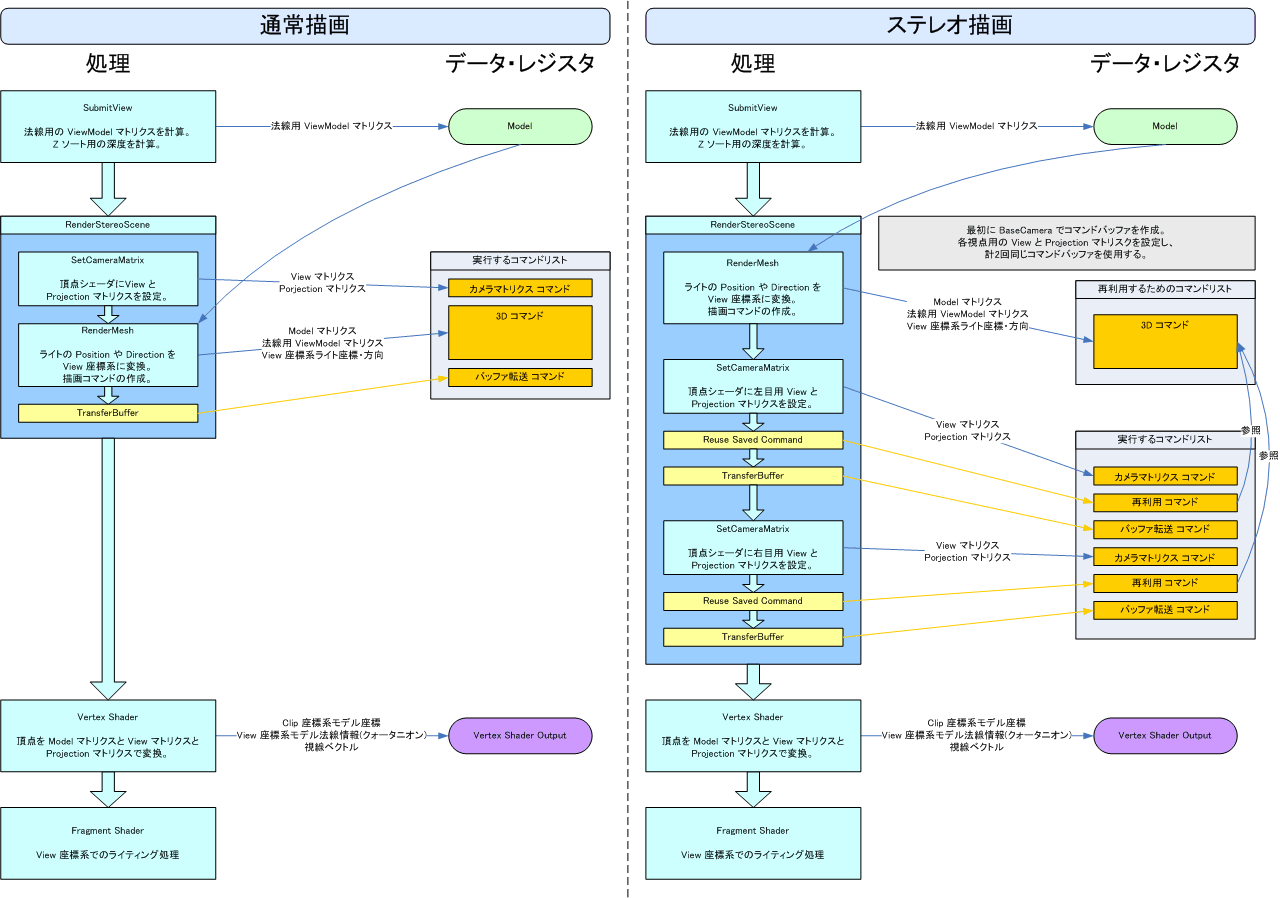
Rendering is performed in the order given below in the case of standard rendering.
- Camera configuration with SetCameraMatrix
- 3D command creation with RenderMesh
- Buffer transfer command configuration
In the case of stereo rendering, performance can be greatly improved compared to calling RenderMesh twice by re-using commands as follows to perform rendering.
- 3D command creation with RenderMesh
- Save 3D command
- Left-eye camera configuration with SetCameraMatrix
- Set access to saved 3D command
- Buffer transfer command configuration
- Right-eye camera configuration with SetCameraMatrix
- Set access to saved 3D command
- Buffer transfer command configuration
Callbacks can be called during the following processess.
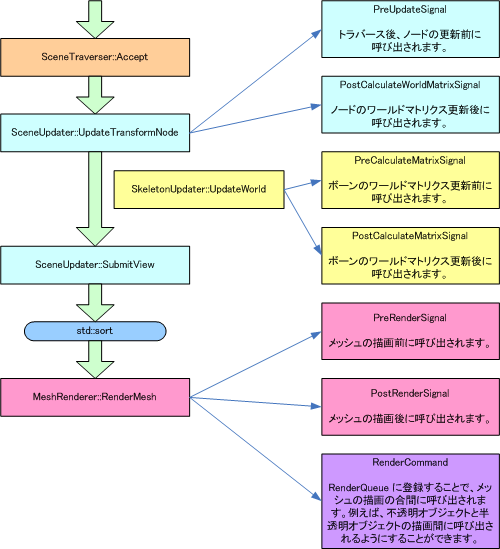
There are two methods of implementing callbacks.
Specify the number of signals at time of creation using Model or other such class.
Specify the maximum number of callbacks using MaxCallbacks of the SceneBuilder class. Or, automatically generate the signal when adding the callback by setting IsFixedSizeMemory to false.
For details on RenderCommand, see Interrupt Processing During Rendering.
The following are examples of setting a callbacks.
Passing Arguments
Functions such as those below can be set as callbacks (PreRenderSignal here).
void PreRenderCallback(nw::gfx::Model* model, nw::gfx::ResMesh mesh, nw::gfx::RenderContext* renderContext)
{
    ....
}
To set this function as a callback, create a slot and connect as given below.
model->PreRenderSignal().CreateAndConnect(PreRenderCallback);
Passing Function Objects
Function objects such as those below can be set as callbacks (PreRenderSignal here).
class RenderCallbackFunctor
{
public:
    void operator () (nw::gfx::Model* model, nw::gfx::ResMesh mesh, nw::gfx::RenderContext* renderContext)
    {
        ....
    }
};
To set this function as a callback, create a slot and connect as given below.
model->PreRenderSignal().CreateAndConnect(RenderCallbackFunctor());
Passing a Slot
A class that inherits a slot such as shown below can be set as a callback (PreRenderSignal here).
class RenderCallbackSlot : public nw::gfx::Model::RenderSlot
{
public:
    RenderCallbackSlot(nw::os::IAllocator* allocator)
    : nw::gfx::Model::RenderSlot(allocator)
    {
    }
    virtual void Invoke() (nw::gfx::Model* model, nw::gfx::ResMesh mesh, nw::gfx::RenderContext* renderContext)
    {
        ....
    }
};
To set this slot to a callback, connect as given below.
void* memory = allocator.Alloc(sizeof(RenderCallbackSlot));
RenderCallbackSlot* slot = new(memory) RenderCallbackSlot(&allocator);
model->PreRenderSignal().Connect(slot);
The slot is automatically destroyed when the signal is destroyed by passing an allocator to the RenderSlot constructor. To prevent automatic destruction, pass NULL to the contructor.