The Wii console communicates with its standard controller, the Wii Remote, using wireless technology in the 2.4 GHz band. The Wii Remote includes a Rumble motor, Pointer, Motion Sensor, speaker, Player Indicator, and external extension connector. When external extension controllers are connected to the external extension connector, a variety of user interfaces become available.
The Wii Balance Board communicates with the Wii console using the 2.4 GHz wireless band in the same manner as the Wii Remote. However, the Wii Balance Board does not have parts such as the Rumble motor, Pointer, Motion Sensor, speaker, or external extension connector. Instead, it has pressure sensors specialized for measuring weight and center of gravity placed on each of its four corners.
The WPAD library, which includes a higher-level library (KPAD), is implemented as follows. The WBC library is a high-level WPAD library that calculates weight from the values obtained by the WPAD library for the Wii Balance Board's pressure sensors. The KPAD library is a high-level WPAD library designed to make it easier for games to use input data obtained from the WPAD library. The KPAD library can handle weight data if the WBC library has been linked.
KPAD API WPAD API WBC API WPAD API
The WPAD library detects the Nunchuk and Classic Controller by default. The WPAD library can detect other external extension controllers and the Wii Balance Board if a special library is linked for each device. If these special libraries are not linked, whenever an external extension controller is connected, it is recognized asWPAD_DEV_FUTURE. A Wii Balance Board cannot be connected if the WBC library is not linked.
Shown below are controllers and the libraries required for the WPAD library to detect them.Libraries other than
WPAD_DEV_BALANCE_CHECKER WBC library WPAD_DEV_GUITAR WPADGtr library WPAD_DEV_DRUM WPADDrm library WPAD_DEV_TAIKO WPADTko library WPAD_DEV_TRAIN WPADTrn library WPAD_DEV_TAIKO WPADTko library WBCare not included with the standard Revolution SDK. Developers who require these libraries should contact Nintendo.
Begin initialization of the WPAD library by calling the WPADRegisterAllocator function; this registers the allocator function used to obtain work memory during initialization. Be sure to implement the allocator in such a way that work memory can be acquired from MEM2. To retrieve the total size of work memory allocated by the library, use the WPADGetWorkMemorySize function.
Wii Balance Board registration data could not be saved to the console while the Japanese version of Wii Fit was under development, so it is saved with Wii Fit's save data. Consequently, Japanese applications that use the Wii Balance Board should use the WPADRegisterBLCWorkarea function to register a buffer for the library to get Wii Balance Board registration data from the Wii Fit save data. There is no need for applications to register the buffer in regions outside Japan because Wii Balance Board registration data can now be saved to the console.
After registering the work memory, call the WPADInit function to initialize the WPAD library. Because it takes time to initialize the WPAD library, periodically call the WPADGetStatus function to check when initialization is complete. After initialization is complete, the buffer registered by the WPADRegisterBLCWorkarea function is not used and may be deleted.
For devices to communicate with the Wii console, both the Wii console and the device must first be registered with each other. This registration process is called pairing. The Wii console and the device can each register only a fixed number of corresponding devices or consoles. If more than this number are paired to either one, information for those already paired are overwritten. In addition, all pairing information maintained by the Wii console is automatically deleted if the SYNC button on the Wii console is pressed for 10 or more seconds. (However, this information is not automatically deleted if a callback has been registered using the WPADSetClearDeviceCallback function.) Note that doing so does not delete the pairing information maintained by the Wii Remote.
There are two methods of registering Wii Remotes with a Wii console: normal pairing and simple pairing. The pairing information of a normal-paired Wii Remote remains registered even after the Wii console power has been turned OFF, and with a normal-paired Wii Remote, Wii console power can also be turned ON or OFF using the Wii Remote Power Button. However, if the Wii Remote has been simple-paired and the Wii console is reset or turned OFF, the pairing information maintained by the Wii console is deleted. Also, power to the Wii console cannot be turned ON or OFF using the power button on a simple-paired Wii Remote. The reason for this is that normal pairing is intended to be used when a user pairs their own Wii Remote to their own Wii console, but simple pairing is intended to be used when a user pairs their Wii Remote to a Wii console owned by a friend.
Note: The specification for simple pairing has been changed. The pairing information for a simple-paired Wii Remote is now maintained until the Wii console power is turned OFF.As a result, simple-paired Wii Remotes can remain connected to Wii even when applications are reset and when the user moves between Wii Menu and various Wii Channels. However, applications built with SDK versions SDK2.4 patch6 or earlier use the old specification for simple pairing. Thus, when you move to one of these applications, the simple-paired Wii Remote's connection will be dropped. Furthermore, if simple pairing is conducted while this kind of application is running, the connection will be dropped even if the process later moves to an application that uses the new specification for simple pairing.
For Wii Remotes, a Wii console can store 10 normal pairings and 6 simple pairings. A single Wii Remote will be treated as paired through one of these two methods. For Wii consoles, a Wii Remote can store both one standard pairing and one simple pairing. A single Wii console will be treated as paired through one of these two methods.
When a normal pairing is performed on a simple-paired device, that device is then treated as normal-paired. However, when a simple pairing is performed on a normal-paired device, that device continues to be treated as normal-paired.
Normal pairing is performed by pressing SYNCHRO on the front of the Wii console, or by calling theWPADStartSyncDeviceorWPADStartFastSyncDevicefunction and pressing SYNCHRO inside the battery cover of the Wii Remote. When the pairing completes, the Wii Remote information will be stored in the Wii console. In the same way, the Wii console information will be stored in the Wii Remote.
By calling theWPADSetSyncDeviceCallbackfunction and setting a user callback function in advance, game applications can determine when SYNCHRO on the Wii console is pressed. If a callback function has been set, pairing will not occur automatically when SYNCHRO is pressed; in such cases you must begin the pairing by calling theWPADStartSyncDevicefunction. The registered callback function will also be called again after pairing is complete, and it will send notification of how many Wii Remotes were successfully paired.
The simple pairing remains effective only until the Wii console is shut down. Game applications can start a simple pairing by calling theWPADStartSimpleSyncorWPADStartFastSimpleSyncfunction. Simple pairing occurs when the Wii Remote 1 and 2 Buttons are pressed at the same time. However, if a Wii console is already registered, the Wii Remote will attempt to connect with that Wii console when the buttons are pressed. If that connection fails, simple pairing will start.
Simple pairing will be executed repeatedly until either four Wii Remotes have been connected, or the application stops the simple pairing by calling theWPADStopSimpleSyncfunction. If a callback is registered, the callback function is called as soon as the pairing process completes, and it sends notification of the number of paired Wii Remotes.
Pairing fails when the two devices attempt to perform fundamentally different pairing. However, it can be successful in the following cases:
- When the Wii console is simple-pairing and the Wii Remote is normal-pairing, the existing pairing information will not be updated and the two will be connected as they are.
- When the Wii console is normal-pairing and the Wii Remote is simple-pairing, in some cases the Wii Remote becomes connected before it even begins to perform simple pairing.
- When a Wii console is already normal-paired to a Wii Remote and then attempts to perform simple pairing with that Remote, the pairing will succeed as normal pairing.
- When a Wii console is already simple-paired to a Wii Remote and then attempts to perform normal pairing with that Remote, the simple pairing is eliminated and replaced by a normal pairing.
If the Wii console's SYNC button is pressed for 10 or more seconds, all information on Wii Remotes paired to that Wii console is deleted. The game application can get this event by calling theWPADSetClearDeviceCallbackfunction and setting a user callback function in advance. When a callback function has been set, deletion of the pairing information will not occur automatically; in such cases you must start the deletion by calling theWPADStartClearDevicefunction. The registered callback function will be called again when the deletion is complete.
Neither normal pairing nor simple pairing can be carried out while the Wii Remote's pairing information is being deleted.
The Wii Balance Board can use only normal pairing. While the Wii Balance Board is paired, up to nine Wii Remote pairings can be stored. Wii Balance Boards are paired, and their pairing information deleted, in the same manner as a Wii Remote.
Although also mentioned in Notes on Initializing Wii Balance Board-Compatible Applications, the Japanese version of Wii Fit is the only application with a different way of handling pairing information for the Wii Balance Board. Although pairing information is usually stored in the Wii console's system configuration file, in the case of the Japanese version of Wii Fit, it is stored inside the Wii Fit save data because of circumstances surrounding development. Because the Wii Balance Board pairing information is also subsequently recorded in the Wii console's system configuration file, Wii Balance Board-compatible applications intended for Japan must synchronize the pairing information in Wii Fit save data with that in the system configuration file. This synchronization process is carried out internally by the library. Because a large work memory is required for the synchronization process during initialization, be sure to register a work memory using the WPADRegisterBLCWorkarea function. The work memory is not required after initialization.
When you pair a Wii Balance Board to a Wii console, the Wii Balance Board's pairing information is stored in the system configuration file. If save data for the Japanese version of Wii Fit is present on the Wii console, the pairing information is also stored in that save data.
Pairing information in the system configuration file is deleted by holding down the Wii console SYNC button for 10 or more seconds. If save data for the Japanese version of Wii Fit is present on the Wii console, its pairing information is deleted. However, because of Wii Fit specifications, pairing information is not completely deleted.
A Wii console's power can be turned ON or OFF with the Wii Remote Power Button. If the console is currently turned OFF, it is turned ON by pressing the Power Button. If the console is currently turned ON, pressing the Power Button for approximately one second will send a power-OFF signal to the console, and the callback registered by the OSSetPowerCallback function will be called.
The power ON/OFF operation cannot be performed with a simple-paired Wii Remote, only with a normal-paired Remote.
Game applications can call the WPADProbe function to get the connection status of each controller by its number. If an external extension controller is plugged into a Wii Remote, this function also returns the current type of the external extension controller. Because this function confirms the insertion and removal of an external extension controller, we recommend that the game application call this function at least once within the main loop. To determine if a controller has been connected or disconnected, use the WPADSetConnectCallback function to register a callback function in advance. To detect the insertion and removal of an external extension controller, use the WPADSetExtensionCallback function to register a callback function in advance.
When a Wii Remote which already has an external extension controller inserted is connected to a Wii console, the type of the external extension controller is not immediately known, because recognition of the external extension controller only occurs after the Wii Remote has completed its connection. Accordingly, the status obtained by the WPADProbe function changes over time. Immediately after the Wii Remote is connected, the function returns WPAD_DEV_CORE. After that, the Wii Remote notifies the console that it has an external extension controller attached, and the library checks the external extension controller's type. In the period between notification and verification of the controller's type, the function returns WPAD_DEV_UNKNOWN. Following verification, the function returns a value such as WPAD_DEV_FREESTYLE or WPAD_DEV_CLASSIC, depending on the type.
The WPADGetInfo(Async) function can also be called to get the current information about the controller (remaining battery power, Player LED status, and so on).
Game applications can perform a variety of controls on the Wii Remote, including changing the format of the received data, obtaining the status of a Remote, and starting and stopping the Pointer. However, these controls must wait for an ACK to be received from the Wii Remote, and must be processed exclusive of one another. Furthermore, when the ACK is returned only the Wii Remote's button information (out of all the controller information normally returned) is returned along with it. Be aware that if the Motion Sensor, Pointer, or an external extension controller is being used, it will not be possible to obtain their inputs.
The WPAD library maintains separate command queues internally for each channel, and requests from the game application are managed by these queues. When the WPAD library cannot add a new request, WPAD_ERR_BUSY is returned; when this error is returned to the game application, the request should be issued again after waiting.
Be aware that the WPAD library uses these queues internally immediately after attaching, detaching, or connecting an external extension controller.
The Wii Remote can use its buttons, Pointer, and Motion Sensor. In addition, external extension controller input can be used by attaching an external extension controller like the Nunchuk. However, because of the wireless specifications, not all of this data can be sent. Thus, the game application must call the WPADSetDataFormat function to select the format for the controller information according to its application. The following formats for controller information are available.
| WPAD_FMT_CORE | Wii Remote buttons only. |
|---|---|
| WPAD_FMT_CORE_ACC | Wii Remote buttons and Motion Sensor. |
| WPAD_FMT_CORE_ACC_DPD | Wii Remote buttons, Motion Sensor, and Pointer (coordinate data and size). |
| WPAD_FMT_FREESTYLE | Wii Remote buttons and the Nunchuk. |
| WPAD_FMT_FREESTYLE_ACC | Wii Remote buttons, Motion Sensor, and the Nunchuk. |
| WPAD_FMT_FREESTYLE_ACC_DPD | Wii Remote buttons, Motion Sensor, Pointer (coordinate data), and the Nunchuk. |
| WPAD_FMT_CLASSIC | Wii Remote buttons and the Classic Controller. |
| WPAD_FMT_CLASSIC_ACC | Wii Remote buttons, Motion Sensor, and the Classic Controller. |
| WPAD_FMT_CLASSIC_ACC_DPD | Wii Remote buttons, Motion Sensor, Pointer (coordinate data), and the Classic Controller. |
| WPAD_FMT_CORE_ACC_DPD_FULL | Wii Remote buttons, Motion Sensor, and Pointer (coordinate data, size, object radius, pixel value, and range).Note: The sampling rate is half of the rate for other formats. |
| WPAD_FMT_TRAIN | Wii Remote buttons and the Master Controller. |
| WPAD_FMT_GUITAR | Wii Remote buttons, Motion Sensor, Pointer (coordinate data), and Guitar Controller. |
| WPAD_FMT_DRUM | Wii Remote buttons, Motion Sensor, Pointer (coordinate data), and the Drum Controller. |
| WPAD_FMT_TAIKO | Wii Remote buttons, Motion Sensor, Pointer (coordinate data), and the Taiko Controller. |
| WPAD_FMT_BALANCE_CHECKER | Wii Balance Board. |
| WPAD_FMT_MPLS | Wii Remote buttons, Motion Sensor, Pointer (coordinate data), and Wii MotionPlus. Use this format when the format is MotionPlus Style, Nunchuk/MotionPlus Style, or Classic/MotionPlus Style. In addition, when using Nunchuk/MotionPlus Style or Classic/MotionPlus Style, the Wii MotionPlus sampling rate and the Nunchuk or Classic Controller sampling rate is half the normal rate. Classic/MotionPlus Style is not supported by Wii MotionPlus PP2. |
Note: When selecting a format that uses the Pointer, before calling WPADSetDataFormat, call the WPADControlDpd function to start the Pointer.
There are two ways to obtain controller information.
Use the WPADRead function to get the most recent controller information for the Wii Remote on the specified channel.
To set the buffer for periodically storing controller information, use theWPADSetAutoSamplingBuffunction. Buffers are used internally as ring buffers. The buffer index that stored the most recent controller information can be obtained with theWPADGetLatestIndexInBuffunction.
The WPADRead and WPADSetAutoSamplingBuf functions can be used together.
The type of the controller information that can be obtained with the WPADRead and WPADSetAutoSamplingBuf functions is recorded in a structure type that corresponds to the data format specified by the WPADSetDataFormat function. For information on controller types, data formats, and corresponding structure types, see the section about the WPADSetDataFormat function. If the data is recorded in a structure type that does not match the data format, it may not be possible to get valid data.
Use the WPADSetSamplingCallback function to register the callback function called every time the data is received from a Wii Remote at a specified channel.
Prohibition processing for the +Control Pads of the Wii Remote and the Classic Controller is performed internally by the WPAD library. If the +Control Pad physically breaks and its input is in a state that is ordinarily impossible, such as simultaneous presses of Left and Right, the library processes it as valid input of Left. Similarly, if Up and Down are simultaneously pressed, the library takes the valid input to be Up.
A variety of external extension controllers can be attached to the Wii Remote through the external extension connector, even while the Wii Remote is communicating. The game application can detect the insertion or removal of an external extension controller. It does this by polling with the WPADProbe function or by registering a callback function in advance using the WPADSetExtensionCallback function. Immediately after an External Extension Controller has been inserted in the Wii console, however, it is impossible to know what has been inserted. Therefore WPAD_DEV_UNKNOWN is used as the device type at the time of detection. Later, as soon as the type of External Extension Controller is known, the device type is updated (for example, WPAD_DEV_FREESTYLE or WPAD_DEV_CLASSIC). Also, if an external extension controller is inserted or removed during communications, the Wii Remote stops sending controller information. Therefore, when a plug insertion or removal is detected, use the WPADSetDataFormat function to reset the controller information's data format according to the situation. Once the settings are complete, controller information will be sent from the Wii Remote.
The Rumble feature of the Wii Remote can be turned ON or OFF. The ON/OFF setting is stored internally within the library. When the library is initialized, the ON/OFF setting for the Rumble feature is set by default to the value in the console settings. When the Rumble feature is turned ON, the WPADControlMotor function can be used to control the vibration of the Wii Remote on a specified channel. In addition, the WPADStartMotor and WPADStopMotor functions are available as macro functions.
The status of the Rumble feature's ON/OFF setting maintained within the library can be obtained with the WPADIsMotorEnabled function. Although the WPADEnableMotor function can turn the Rumble feature ON or OFF, do not enable the Rumble Feature when it has been turned OFF in the console settings.
The value maintained by the library can be saved to the console settings using the WPADSaveConfig function, but do not call this function from an application.
Use theWPADControlSpeakerfunction to control the speaker of the Wii Remote on the specified channel. Activate the speaker using the functionWPADControlSpeaker. Once activated, audio can be output from the speaker by sending audio data using theWPADSendStreamDatafunction. Due to the audio specifications of the audio processor of the Wii Remote, 20 bytes of audio data must be sent three times every 20 ms in order to achieve correct audio playback.
To set the speaker volume of the Wii Remote on a specified channel, use theWPADSetSpeakerVolumefunction. However, because this volume change is not enabled until the speaker is restarted with theWPADControlSpeakerfunction, the volume of the Wii Remote speaker's currently playing audio will not change. In order to alter the volume of the currently playing audio, change the volume of the audio data source. The volume configured using this function can be saved in the Wii console using theWPADSaveConfigfunction.
In order to avoid wearing down the batteries in scenes where no audio is output through the Wii Remote speaker for a period of time, use theWPADControlSpeakerfunction to send theWPAD_SPEAKER_OFFcommand whenever possible to stop the speaker. However, starting or stopping the speaker will prevent you from being able to obtain several samples' worth of input from the Motion Sensor, Pointer, and external extension controller of the Wii Remote. Accordingly, in scenes in which audio is output frequently, there is no need to start and stop the speaker often. In such scenes, keep the speaker ON the whole time, and instead of starting and stopping the speaker, use theWPADControlSpeakerfunction to send aWPAD_SPEAKER_MUTEorWPAD_SPEAKER_MUTE_OFFcommand to turn muting ON/OFF.
Due to the audio processor and wireless communication specifications of the Wii console and the Wii Remote, there are times when the audio will break or skip. Broken audio (crackling and popping) occurs when the state of the encoder on the Wii console side and the decoder on the Wii Remote side are out of sync with each other. The audio will break up as long as the encoder and decoder are out of sync. In order to synchronize the state of the encoder and decoder, you must restart the speaker. Audio skipping occurs when a sample on the Wii Remote side could not be processed. Consequently, even if you do not take any specific action, there are no problems with subsequent playback.
Due to the audio processor specifications, audio played with the Wii Remote's speaker may break or skip if audio is played back continuously for eight minutes or longer.To avoid this, do one of the following:In addition, due to the specifications for wireless communication, it has been confirmed that the Wii Remote speaker will break up audio in the following situations. To avoid broken audio in the following cases, call the
- Restart the speaker using the
WPADControlSpeakerfunction within 8 minutes of beginning audio playback.- Refrain from playing audio for one second or more within eight minutes after beginning audio playback.
WPADCanSendStreamDatafunction when sending audio in order to make sure the audio can be sent and played without breaking up.
- When packet loss due to external noise goes above a certain amount
- When an External Extension Controller is inserted
- When attempting to pair another Wii Remote to the Wii console (regardless of whether the pairing succeeds or fails)
- When a command is sent (especially when accessing internal memory)
The Rumble feature ON/OFF setting and speaker volume setting for Wii Remotes can be saved on the Wii console. Values set with the WPADEnableMotor and WPADSetSpeakerVolume functions can be saved on the Wii console using the WPADSaveConfig function.
However, do not allow these settings to be changed outside the HOME Menu in the release version.
The memory built into the Wii Remote is called Wii Remote memory. The Wii Remote memory allocates only one slot for the saving of game data. Although 4000 bytes are allocated for this slot, the library uses the first 112 bytes to manage file information. Thus, the application actually has access to only 3888 bytes for the saving of game data. Applications can freely read and write the area between the 112th and 4000th byte using the WPADReadGameData and WPADWriteGameData functions. Note, however, that the file information is updated whenever game data is written to this region.
The file information contains the following.
| Title Name | A string of up to 16 characters, UTF-16 encoded. Use the WPADSetGameTitleUtf16 function to configure this string. |
|---|---|
| Time of Last Update | The file information can store the time when the game data was last updated as an OSTime type. Get this information with the WPADGetGameDataTimeStamp function. The obtained value can be converted to the Western calendar using the OSTicksToCalendarTime function. |
| Game Code | Stores the game code of the application that wrote the game data. This value is used internally by the library. |
To read details about the error codes that are returned when reading and writing game data, see the descriptions for the WPADReadGameData and WPADWriteGameData functions. Also see the guidelines to read about other notes and precautions.
If your application makes use of very small acceleration values, be sure to keep in mind the existence of Wii Remote acceleration noise.
For more information, see the Wii Controller Overview.
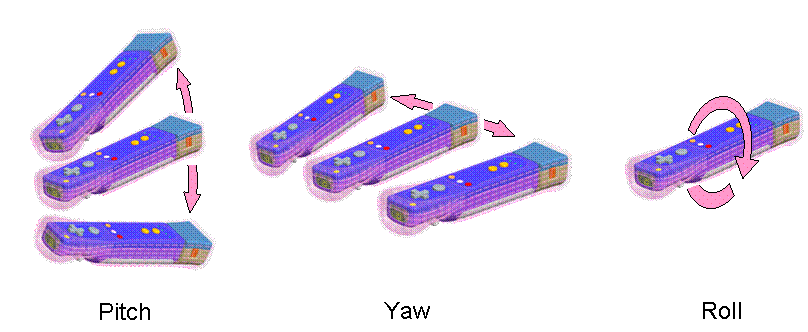
The Wii MotionPlus is equipped with a rate gyroscope that can measure angular velocity in the pitch, yaw, and roll directions. If a Wii Remote starts in a neutral horizontal position, rotation in the pitch direction moves the button side of the Wii Remote from facing up to facing toward or away from the player. Rotation in the yaw direction moves the tip of the remote left or right, while the button side of the Wii Remote remains facing up. Rotation in the roll direction spins the button side of the Wii Remote from facing upward to facing left or right.
Sign conventions follow the right-hand rule: the thumb of the right hand indicates the direction of the rotation vector and the curled fingers of the same hand indicate the positive direction of rotation.
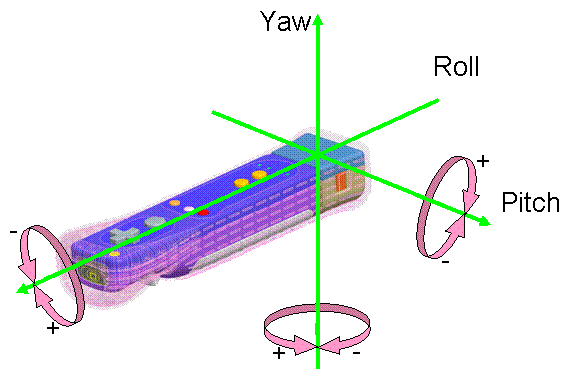
When the user points the Wii MotionPlus in a given direction, the motion of pointing translates into some measurable value of angular velocity around each of the three axes. It is possible to use the angular velocity values to update the direction that the Wii MotionPlus is known to be pointing in. If this pointing direction is updated in each frame with the current angular velocities, the orientation of the Wii Remote being used can be reproduced on the screen.
The Wii MotionPlus has the following characteristics.
Because each directional component is expressed with 14 bits (0-16384), the resolution is relatively poor when the entire range of detectable velocity (±1500 dps) is digitally converted into 14 bits. This poor resolution is especially obvious at lower velocity. To improve this resolution, the sensor's analog output is converted into digital output in two ways: one for the low-velocity range of output from the sensor (approximately ±400 dps), and one for the entire range of output (±1500 dps). The Wii MotionPlus decides automatically which conversion value to provide, using the upper limit of the (0-16384) low-velocity range as a threshold. In the previous figure, the increase/decrease directions for both conversion values are shown for a Wii MotionPlus PP2. However, the Roll increase/decrease direction is reversed for a Wii MotionPlus PP3. (Multiple types of boards exist.) When calculating the angular velocity, however, the directions of increase/decrease are as shown in the previous figure regardless of the board. This is because the calibration value written to such devices is also reversed.
For example, if the low-velocity conversion value is 3 when the user rotates the Wii MotionPlus at -400 dps around the yaw axis, the MotionPlus passes the low-velocity conversion value. However, if the low-velocity conversion value is 0 when the user rotates the Wii MotionPlus at -450 dps around the yaw axis, the MotionPlus selects the entire-range conversion value and passes that to the Wii console.
Note: The values given here were chosen for ease of explanation. The same values are not necessarily obtained if Wii MotionPlus is actually rotated at the velocity given.
You can check which conversion value the Wii MotionPlus has selected by looking at the value of the stat member in the WPADMPStatus structure.
The characteristics of the Wii MotionPlus rate gyroscopes vary by device. These individual differences mean that the values passed from more than one Wii MotionPlus do not necessarily match even when they are at rest or rotated at the same velocity. When using a Wii MotionPlus, be sure to perform calibration first to cover variations of each device.
Depending on the device, the at-rest (zero-point) value when the Wii MotionPlus is operational may drift greatly from the ideal value (near the center of the converted range). Therefore, be sure to execute zero-point reset for the hardware as early as possible when a Wii MotionPlus has been started. Perform a zero-point reset of the hardware by passing WPAD_MPLS_ZRST to the WPADControlMpls function. Only execute a zero-point reset while the Wii MotionPlus is at rest. If a zero-point reset is executed while the Wii MotionPlus is moving, the zero point may drift even more greatly. As stated in the hardware specifications, the zero point should not be reset after the Wii MotionPlus is started until 200 ms elapse. Note that if the zero point is reset before 200 ms have elapsed, the change is voided.
Next, we recommend that you calibrate the value used to convert angular velocity values passed from the Wii MotionPlus. At-rest (zero point) values and constant-velocity rotation values are written to the Wii MotionPlus as calibration values. However, the Wii MotionPlus has a characteristic called "temperature drift," where the zero-point drifts due to the temperature. Therefore, the value passed by the Wii MotionPlus does not always match the zero-point calibration value at such times. If the value passed differs greatly from the calibration value, we recommend that you perform a zero-point reset using the WPADSetMplsCalibration function while the Wii MotionPlus is at rest.
You must take the values passed from the Wii MotionPlus and apply these calibration values to calculate the actual angular velocities that you will use. You can get the calibration values with the WPADGetMplsCalibration function. Use the following formula to convert Wii MotionPlus output values to angular velocity.
Angular velocity = ( (output value obtained from Wii MotionPlus) - (at-rest zero point value) ) / (constant-speed rotation value) * (magnitude of the constant speed)
In addition, each Wii MotionPlus has two sets of calibration values. There is one set each for the two resolution values that are passed to the console. The value passed is the result of the automatic digital conversion and selection process previously described. Note that before calculating angular velocity, you need to check the value of the stat member of the WPADMPStatus structure to determine which conversion value is being used for the digital value passed from the Wii MotionPlus. Only once you know the type of conversion can you get the appropriate calibration values with the WPADGetMplsCalibration function.
The Wii MotionPlus behaves differently from the Nunchuk, Classic Controller, and other normal external extension controllers. When a normal external extension controller is plugged into the Wii Remote, the Wii Remote recognizes that an external extension controller has been inserted and automatically sends notification to the Wii console. Once the WPAD library receives this notification, it can recognize the external extension controller. However, if a Wii MotionPlus is inserted into a Wii Remote, the Wii Remote does not automatically recognize it. To make the Wii Remote recognize the Wii MotionPlus, the application must explicitly send a startup command to the MotionPlus. The Wii MotionPlus is started explicitly in this way because it has multiple operating modes.
In this state, the Wii MotionPlus is stopped. This is also the initial state of the Wii MotionPlus. When the Wii MotionPlus is in this state, the Wii Remote cannot detect that the MotionPlus has been inserted. If a Nunchuk, Classic Controller, or other external extension controller is plugged into the external extension controller connector on the Wii MotionPlus while the MotionPlus is in this state, the MotionPlus forms a bypass connecting the Nunchuk or other controller to the Wii Remote. For this reason, these external extension controllers are recognized by the Wii Remote and the WPAD library just as if they had been directly inserted into the Wii Remote.
In this state only the Wii MotionPlus is running. When in this mode, the Wii Remote sends the latest Wii MotionPlus values to the Wii console. Start the Wii MotionPlus in this mode by passing WPAD_MPLS_STD to the WPADControlMpls function. When the Wii MotionPlus is in this mode, Wii MotionPlus operations do not change even if an external extension controller is plugged into the connector of the Wii MotionPlus.
In this mode, the Wii MotionPlus and a Nunchuk or Classic Controller plugged into the connector for external extension controllers on the Wii MotionPlus can be used at the same time. When in this mode, if any device is plugged into the connector for external extension controllers on the Wii MotionPlus, the Wii Remote alternately sends the values for the Wii MotionPlus and values for the plugged-in device to the Wii console. However, when in this mode, only Nunchuk or Classic Controller data is valid as the external extension controller data sent to the Wii console. Other data is not processed. You can check whether external extension controller data is enabled using the stat member of the WPADMPStatus structure. If no devices are plugged into the Wii MotionPlus, the latest values for the Wii MotionPlus are sent to the Wii console just as in standard mode. Extension mode is further divided into two modes. The first mode is used when a Wii MotionPlus and Nunchuk are used at the same time. Start the Wii MotionPlus in this mode by passing WPAD_MPLS_FS to the WPADControlMpls function. The other mode is used when a Wii MotionPlus and Classic Controller are used at the same time. Start the Wii MotionPlus in this mode by passing WPAD_MPLS_CL to the WPADControlMpls function. However, these operations are supported starting with Wii MotionPlus PP3. When in this mode, if a Nunchuk or Classic Controller is plugged in, the Wii MotionPlus alternately sends values for the Wii MotionPlus and values for the Nunchuck or Classic Controller to the Wii console. For this reason, be sure to note that the sampling rate is half the standard rate when using a Wii MotionPlus at the same time as a Nunchuk or Classic Controller. In addition, starting with the Wii MotionPlus PP3, the Wii MotionPlus does not need to be restarted. This is because continued use is possible even if a Nunchuk or Classic Controller is reconnected while running in this mode.
A diagram showing the transitions between operating modes of the Wii MotionPlus is provided below. The WPADControlMpls function changes the operating mode. When the Wii MotionPlus is started, the WPAD library recognizes it with the same procedure it uses to recognize the Nunchuk and the Classic Controller. The current operating mode can be obtained with the WPADGetMplsStatus function.
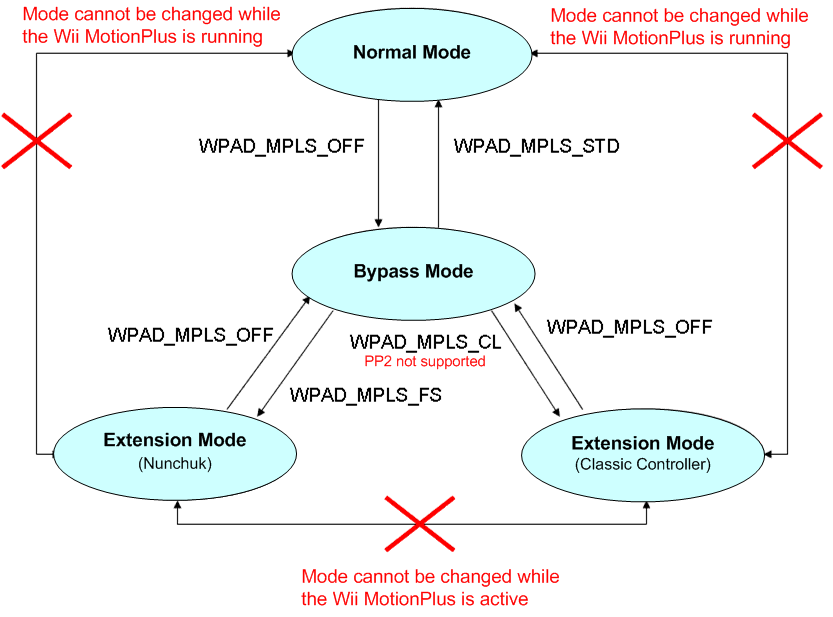
The Wii MotionPlus has a connector for external extension controllers. The Nunchuk, Classic Controller, and other external extension controllers can be plugged into this connector, but another Wii MotionPlus cannot be plugged in. In the case of a Wii Remote connector, you can determine whether an external extension controller has been plugged in by using the WPADProbe or WPADSetExtensionCallback function. Starting with the Wii MotionPlus PP3, the status of the Wii MotionPlus connector can be obtained using these functions just as with a Wii Remote. When a Wii MotionPlus is running, the device type returned by these functions is WPAD_DEV_MPLS. Therefore, if an external extension controller is plugged into the Wii MotionPlus, the device type changes as follows depending on the device that has been plugged in.
| Nunchuk | WPAD_DEV_MPLS_FREESTYLE |
|---|---|
| Classic Controller | WPAD_DEV_MPLS_CLASSIC |
| Other External Extension Controllers | WPAD_DEV_MPLS_FUTURE |
For example, the device type WPAD_DEV_FREESTYLE results if a Wii MotionPlus is plugged into a Wii Remote and a Nunchuk is plugged into the Wii MotionPlus. If the Wii MotionPlus is started in this state, the device type changes as follows: WPAD_DEV_CORE → WPAD_DEV_UNKNOWN → WPAD_DEV_MPLS → WPAD_DEV_MPLS_FREESTYLE.
Changes in the device type do not depend on the operational mode of the Wii MotionPlus. Whether the operational mode is standard mode or extension mode, the device type WPAD_DEV_MPLS results if only a Wii MotionPlus is plugged into the Wii Remote. In addition, the device type changes as shown in the table above when a Nunchuk, Classic Controller, or other external extension controller has been plugged in. If any of these extension controllers are unplugged from the Wii MotionPlus, the device type returns to WPAD_DEV_MPLS.
Over time, as the system updates the orientation of the Wii MotionPlus based on the angular velocity values it yields, this calculated orientation may gradually begin to differ from the actual orientation. This mismatch will increase over time. This phenomenon is caused by the accumulation of very small amounts of error from the calculations performed in each update cycle.
As stated in the specifications for Wii MotionPlus rate sensors, the scale value for the written calibration values can vary by as much as ±8 percent due to the effects of humidity, air temperature, and device age. You should design your game specification so that an error margin within this range does not cause any problems. To be more specific, if for example the angle of rotation is 90 degrees, the information should be obtained for 90 degrees ±8 percent (that is, 82.8 to 97.2 degrees).
Usually, controller information obtained from the Wii Remote can be confirmed by checking the value of the err member of the WPADStatus structure, and also checking that there are no problems in the data content. In the case of a Wii MotionPlus, be sure to check the value of the stat member of the WPADMPStatus structure in addition to the value of the err member. This is recommended to distinguish cases where the Wii MotionPlus is operating in extension mode but its external extension controller has been unplugged, because in these cases some of the data that it provides can still be used normally.
Initialization is required starting with the Wii MotionPlus PP3. Because the initialization process of the Wii MotionPlus takes time, initialization is executed in parallel with standard operations of the Wii MotionPlus. For this reason, the initialization process itself completes about 20 seconds after the Wii MotionPlus is started. Because commands are sent from the library to the Wii MotionPlus during the initialization process, the WPADProbe function sometimes returns WPAD_ERR_BUSY. Applications do not need to recognize this because the Wii MotionPlus functions normally except for this.
The Classic Controller and the Classic Controller Pro differ in terms of the shapes of the LR analog buttons and the quantity of analog input. However, the Classic Controller Pro is recognized as a regular Classic Controller when it is attached to the Wii remote, so applications cannot distinguish between the two.
For this reason, from SDK 3.3 on, LR analog button input is not allowed and always returns zero. Also, it is harder to send input from the LR buttons of the Classic Controller than from the Classic Controller Pro because the buttons must be pressed down. Now, even pressing the LR buttons a little is recognized as button input.
The error codes returned from the WPAD library can be grouped into the following three categories.
WPADProbe function. Shows the Wii Remote status.WPADStatus structure. Shows the status of the acquired input data.Because only the first and second categories of error codes will be described here, for the third category of errors, refer to the individual function descriptions.
Among the error codes defined in the WPAD library, those returned by the WPADProbe function are described below.
| WPAD_ERR_NONE | The Wii Remote is connected, and control commands are not being sent from the Wii console to the Wii Remote. |
|---|---|
| WPAD_ERR_NO_CONTROLLER | The Wii Remote is disconnected. |
| WPAD_ERR_BUSY | A control command has been sent to a connected Wii Remote, and the system is waiting for an ACK from the Wii Remote. |
Shown below are the error codes that are passed to the err member variable of the WPADStatus structure, and the descriptions of those error codes.
| WPAD_ERR_NONE | Data with the specified data format was received. |
|---|---|
| WPAD_ERR_NO_CONTROLLER | Data has never been received. |
| WPAD_ERR_INVALID | The format of incoming data is different from the format specified for the WPAD library. Values other than err and dev are undefined. (In this case, the Wii Remote and external extension controller data is invalid.) |
| WPAD_ERR_CORRUPTED | An external extension controller, such as the Nunchuk or Classic Controller, is partially inserted into the Wii Remote. Data for the external extension controller is corrupted. (However, Wii Remote data is not corrupted.) |
If there has been no change in controller input for a fixed period of time, the WPAD library will disconnect. This prevents the Wii Remote's battery power from running out due to user neglect. The WPAD Library checks for input from the buttons, Motion Sensor, Pointer, and external extension controller. Consequently, even if the Wii Remote is left alone, its input may change if someone walks heavily around it, if the Pointer is facing the window, or in some other situations. Be aware that the Wii Remote may therefore not be disconnected after the set period of time.
Although the initial setting is 5 minutes, it can be changed with the WPADSetAutoSleepTime function. It is also possible to use the WPADResetAutoSleepTimeCount function to reset the elapsed time since input stopped changing.
The analog stick origin of a Nunchuk or Classic Controller can be reset by holding down the A, B, +, and - Buttons on the Wii Remote or Classic Controller for three seconds. However, the origin cannot be reset with button combinations such as the A and B Buttons on the Wii Remote combined with the + and - Buttons on the Classic Controller.
The WPAD library keeps track of the last Wii Remote that connected to each controller port only while the Wii console is running. In other words, this information is cleared if the Wii console is shut down, but remains unchanged if the Wii console is reset. (Information recorded to each controller port is cleared immediately after the Wii console is started.)
When a Wii Remote initiates a connection, its information is compared with the information for the last Wii Remote to be connected to each controller port. If the same information is found, the Wii Remote is assigned to that controller port. If the same information could not be found after checking all of the controller ports, it is assigned to the open controller port with the lowest number.
Recorded Wii Remote information is cleared in the following situations. If the WPADDisconnect function is used to disconnect a Wii Remote, information is cleared for the Wii Remote on the disconnected controller port. If the OSShutdownSystem function is called or the Power Button is pressed and held to shut down the Wii console, the Wii Remote information for all controller ports is cleared.
For example, the following shows the Wii console immediately after starting up.
| Port 1 | ---- |
|---|---|
| Port 2 | ---- |
| Port 3 | ---- |
| Port 4 | ---- |
If Wii Remotes A, B, and C are connected in order, the lowest-numbered open port is assigned to each Wii Remote in order because no Wii Remote information has been stored.
| Port 1 | Wii Remote A |
|---|---|
| Port 2 | Wii Remote B |
| Port 3 | Wii Remote C |
| Port 4 | ---- |
Assume that Wii Remote A is disconnected due to a depleted battery and that Wii Remote B is disconnected after a fixed period of time without input. At this point, the information in Port 1 and Port 2 is kept unchanged.
| Port 1 | Wii Remote A |
|---|---|
| Port 2 | Wii Remote B |
| Port 3 | Wii Remote C |
| Port 4 | ---- |
When Wii Remote B is reconnected after its battery has been replaced, it is assigned to Port 2 because its information is still recorded there.
| Port 1 | Wii Remote A |
|---|---|
| Port 2 | Wii Remote B |
| Port 3 | Wii Remote C |
| Port 4 | ---- |
When Wii Remote D is connected, its information has not been recorded anywhere, so it is assigned to the open port with the lowest number: Port 1. The information in Port 1 is replaced with Wii Remote D's information.
| Port 1 | Wii Remote D |
|---|---|
| Port 2 | Wii Remote B |
| Port 3 | Wii Remote C |
| Port 4 | ---- |
When Port 1 is disconnected using the WPADDisconnect function, its information is cleared.
| Port 1 | ---- |
|---|---|
| Port 2 | Wii Remote B |
| Port 3 | Wii Remote C |
| Port 4 | ---- |
When the Wii console is shut down, all information is cleared.
| Port 1 | ---- |
|---|---|
| Port 2 | ---- |
| Port 3 | ---- |
| Port 4 | ---- |
The WPAD library's close process is now performed inside the OS library's reset function. When closing the library, call the OS library reset/shutdown function from the application.
The OSShutdownSystem function disconnects all communicating Wii Remotes. Although the OSRestart, OSReturnToMenu, and OSRebootSystem functions disconnect all communicating Wii Remotes, the remotes are in an auto-reconnect state (reconnect without any button input) for about 15 to 20 seconds after disconnection. When a game application is restarted or moves to the Wii Menu, it is possible to restore the pre-reset state without any button input from the user.
The Wii console and the Wii Remote communicate using the 2.4-GHz band. Using a wireless LAN on the same 2.4-GHz band may cause interference, resulting in communication problems. To avoid such interference, the SDK automatically switches the frequency band that it uses. The application no longer needs to be aware of this issue.
When the application is reset while the Wii Remote is attached, in some rare instances the Auto-Reconnect process does not work properly and the Wii Remote is not automatically connected.
This is because the process may occasionally fail if a rash of communication errors occur during the reconnection process (for example, due to jamming).
Because it is impossible for the application to do anything to avoid these symptoms when they occur, there is no specific workaround.
2009/06/23 Explained the effect of interference from other wireless devices. Explained the Classic Controller and the Classic Controller Pro.
2009/06/05 Added a section on handling Wii Remote acceleration noise.
2009/03/06 Updated the explanation about the relation between external extension controllers and libraries.
2009/01/22 Corrected the explanation about the margin of error for Wii MotionPlus calibration values. Explained that the zero point must not be reset until more than 200 ms have elapsed.
2008/12/19 Added a description of the Drum Controller.
2008/12/08 Revised descriptions of Wii MotionPlus operational modes and device types.
2008/12/03 Comprehensively revised the description of the Wii MotionPlus to match new specifications starting with PP3.
2008/12/02 Revised the description of error codes.
2008/11/26 Revised descriptions of external extension controllers and libraries.
2008/09/30 Added explanations for the Wii MotionPlus.
2008/08/27 Revised the description of the Wii Balance Board.
2008/06/04 Revised the description of Wii Remote memory.
2008/05/29 Added a description of prohibition processing for the +Control Pad.
2008/05/19 Revised the description of controller port mapping and added specific examples.
2008/04/16 Added a note stating that external causes may stop automatic disconnection from occurring as configured. Added an explanation for resetting the time elapsed since input stopped changing. Added explanations for the Wii Balance Board. Added information on the relationship between the library and external extension controllers. Added the WBC library to the library structure. Revised error code descriptions.
2007/10/11 Updated the description for speaker controls.
2007/06/07 Added explanation about the simple pairing specification change.
2007/04/03 Added error code descriptions.
2007/03/22 Added a supplemental explanation about turning the Rumble Feature ON and OFF.
2007/02/08 Noted that the Classic Controller can also reset its origin. Noted that Wii Remote pairing is not possible while pairing information is being deleted. Added text about stopping the Wii Remote speaker when it is not in use.
2006/11/09 Added explanation for the process of reconnecting while an external extension controller is attached.
2006/10/23 Changed explanations for pairing and termination processing.
2006/09/18 Added a description for avoiding wireless LAN interference internally. Deleted warnings for the bugs found in SDK 2.2. Added text about change in mapping table handling. Added explanation for controller registration.
2006/09/06 Reflected changes to specifications about turning the Rumble Feature ON/OFF and speaker volume settings. Described problems with controller controls and the speaker. Added information about simple registration, internal memory, automatic disconnect, controller port mapping, close operation, and Control Stick origin reset.
2006/07/04 Added speaker-related information.
2006/06/19 Deleted the object size restriction from the cautions specific to UI tools.
2005/11/10 Added description of DPD module's hardware bug.
2005/11/09 Corrected warnings about the use of the GameCube standard controller. Changed the description of the PAD library treatment in the Nintendo GameCube SDK. Added bug report.
2005/11/01 To reflect the change of interface from EXI to SI, added a caution related to SI. Added links to functions. Added introduction text for the KPAD library. Added bug report.
2005/09/27 Changed the name to DPD. Deleted some hardware descriptions in Introduction.
2005/08/30 Modified description of buttons in Introduction; added a bug report.
2005/08/01 Initial version.
CONFIDENTIAL