The KBD library provides an API to interface with USB keyboards connected to the Wii console. It provides both synchronous (polling) and asynchronous (interrupt callback) methods of retrieving keystrokes. The keystroke API provides access to both the generated Unicode (UTF-16) characters and to low-level USB HID key codes.
The KBD library provides support for the following.
We have included sample demo programs that demonstrate how to use the KBD library under the $REVOLUTION_SDK_ROOT/build/demos/kbddemo/ path.
API function declarations, types, and constants are in the $REVOLUTION_SDK_ROOT/include/revolution/kbd.h header file.
kbd.h header file includes the $REVOLUTION_SDK_ROOT/include/revolution/kbd/kbd_key_defs.h and $REVOLUTION_SDK_ROOT/include/revolution/kbd/kbd_hid_codes.h support header files.
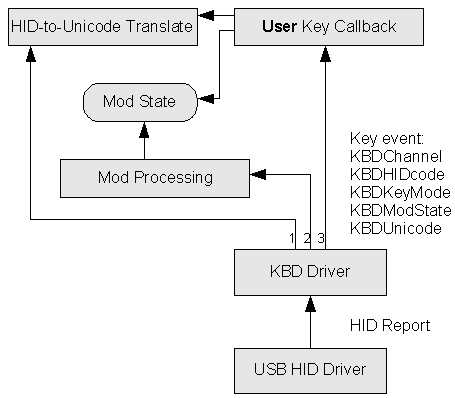
The following diagram describes the keyboard library's main architecture.
Starting at the bottom, when a key is pressed or released on the keyboard, the USB HID driver calls the KBD Driver and passes it a HID report.
KBD Driver module processes the report and turns it into one or more up/down key (KBDHIDCode) events.
For each key event, the KBD Driver module calls the HID-to-Unicode Translate module, the Mod Processing module, and the User Key Callback (in that order).
Given the current keyboard Mod State and country setting, the HID-to-Unicode Translate module converts KBDHIDCode into a KBDUnicode.
The Mod Processing module checks that KBDUnicode represents a modifier action and changes the current keyboard Mod State accordingly.
As an example, if the key code 0xE1 (KBD_HID_Left_Shift) is pressed, it is translated into the (private) Unicode value KBK_Mod_Shift; Mod Processing sees this Unicode value and then makes sure the KBD_MS_SHIFT modifier is turned on in the Mod State.
The KBD Driver handles key repeat processing. Key repeat sets a timer to send additional key down events through the KBD Driver.
User Key Callback is called with both KBDHIDCode and KBDUnicode. In addition, it is also given the key up/down state (KBDKeyMode) as well as the current keyboard Mod State (KBDModState).
User Key Callback may also use the Translate module as well as access or change the current Mod State. It can even alter the key event fields.
KBD Driver finally stores the key event in an internal queue for use by the synchronous character API.
Not shown in the diagram are the keyboard attach/detach event processing and synchronous keyboard API.
KBD library does not maintain the keyboard LED state. By calling the KBDSetLeds, KBSetLedsAsync, or KBDSetLedsRetry function, it is possible to set the LEDs to match the current state of the keyboard modifier keys. The modifier state KBD_MS_SCROLL_LOCK is included to allow setting the scroll lock LED. It is normally toggled by the key mapped to KBK_Scroll_Lock.
The keyboard driver may be utilized at a high-level by ignoring the returned HID codes and only paying attention to the returned Unicode values. In addition, the application should ignore key up events and modifier key presses. A macro has been prepared to simplify this processing. For more details, refer to KBDKeyEvent.
When the KBDGetKey function is called synchronously, the key that was pressed since the last invocation of the function is returned. NULL is returned if no key was pressed since the last invocation. We also provide a function, KBDSetKeyCallback, to register a callback function that will be called with a pointer to a KBDKeyEvent that contains key event information.
Keyboard modifier HID keys are mapped to special Unicode values that affect the modifier state. Some modifier states (for example, KBD_MS_SHIFT, KBD_MS_NUM_LOCK and others) then affect how other keys are looked up in the keymaps. Other modifier states (for example, KBD_MS_ALT, KBD_MS_GUI and others) are just passed along with the base character. The modifier state KBD_MS_SHIFTED_KEY determines whether the unshifted (base) or shifted key is sent when a combination of modifier keys (for example, Shift and Alt) is pressed. This is off by default, and the application should set this modifier bit if it wants the shifted key. This bit also overrides the Num Lock state when set.
All keys are provided with a KBDUnicode value. For the function keys, editing keys, arrow keys, and other special keys, custom (private) Unicode values are used. These private Unicode values are all in the range of 0xf000-0xf1ff, and they should never be used for external data exchange. They should also not be confused with private Unicode values that may be used elsewhere in the Revolution SDK or other SDKs. KBD private Unicode values should only be used with keyboard-related functions.
You may use the KBD_UC_IS_PRIVATE macro to determine if a KBDUnicode value is in the 0xf000-0xf1ff range.
#define KBD_UC_IS_PRIVATE(uc) (((uc)>=0xf000 && (uc)<=0xF1FF) || ((uc)==0xFFFF))
For broader application, you may also define macros such as those below (these are not defined in kbd.h).
// Indicate if a generic Unicode value is private (according to Unicode standard) or not
#define UNICODE_IS_PRIVATE(uc) (((uc)>=0xE000 && (uc)<=0xF8FF) || ((uc)>=0xFFF0))
#define UNICODE_IS_REGULAR(uc) (((uc)<0xE000) || ((uc)>0xF8FF && (uc)<0xFFF0))
KBD private Unicode values are defined in kbd_key_defs.h. Regular Unicode values may be found at the Unicode website.
The keys on the numeric keypad (the operator symbols and the numbers when Num Lock is on) use Unicode values that are the normal ASCII/Unicode value plus 0xf100. The KBD_UC_IS_KP_REG_KEY macro is used to check whether keys are within this range. Furthermore, the KBD_KP_REG_KEY_TO_ASCII macro is used to convert to an ASCII/Unicode value.
#define KBD_UC_IS_KP_REG_KEY(uc) (((uc)>=0xf100) && ((uc)<=0xf13f))
#define KBD_KP_REG_KEY_TO_ASCII(uc) ((uc)&0x3f)
The arrow and editing keys on the keypad are also distinguished from those that are stand-alone keys. The stand-alone keys are in the range of 0xf180-0xf1bf, while the keypad versions are in the range of 0xf140-0xf17f (a difference of 0x40). As an example:
KBK_Insert is 0xf1b0, and
KBK_Keypad_Insert is 0xf170 (0x40 less), and
KBK_Keypad_0 is 0xf130 (0x40 less) (KBK_Keypad_0 is on the same key with KBK_Keypad_Insert), and
'0' is 0x0030 (0xf100 less).
The keys KBK_Keypad_0 - KBK_Keypad_9 and KBK_Keypad_Period are all mapped in a similar way. Note that while KBK_Keypad_Comma is also defined (for use in country maps where it applies), the code for KBK_Keypad_Delete (on the same key) and KBK_Delete are still based on the ASCII code for period.
The KBD_UC_IS_KP_NUM_NL_KEY macro indicates whether a given key is a keypad number key with NumLock on. The KBD_UC_IS_KP_NUM_UL_KEY macro indicates whether a given key is a keypad number key with NumLock off. The macro KBD_KP_NUM_UL_KEY_TO_KP_NUM_NL_KEY can be used to convert the second to the first.
#define KBD_UC_IS_KP_NUM_NL_KEY(uc) (((uc)>=KBK_Keypad_0 && ((uc)<=KBK_Keypad_9)))
#define KBD_UC_IS_KP_NUM_UL_KEY(uc) (((uc)>=KBK_Keypad_Insert && ((uc)<=KBK_Keypad_Page_Up)))
#define KBD_KP_NUM_UL_KEY_TO_KP_NUM_NL_KEY(uc) ((KBDUnicode)((uc)-0x40))
Backspace, Tab, Enter, and Esc are assigned to private Unicode values. These values are the standard ASCII/Unicode values plus 0xf1c0. KBD_UC_IS_CTRL_KEY indicates whether a given key is such a value. Also, these values are converted to ASCII/Unicode by KBD_CTRL_KEY_TO_ASCII.
#define KBD_UC_IS_CTRL_KEY  (((uc)>=0xf1c0) && ((uc)<=0xf1df))
#define KBD_CTRL_KEY_TO_ASCII(uc) ((uc)&0x1f)
For applications that would like to deal with the keyboard at a lower level and access individual physical key presses and release, this can be done as well, because all events are passed through using the APIs described above.
The application can take over some functions normally done by the KBD Driver. It can interpret the HID codes (either by using its own maps or by calling KBDTranslateHidCode). Unique tracking and alteration of modifier key state is also possible. (To disable the driver's modifier key processing, call the KBDSetLockProcessing function.) When key event information is changed by a callback, the modified information is placed in an internal queue and used by the synchronous API.
USB HID codes are intended to be mostly device-independent, meaning that the key in a given position should return the same code regardless of what is printed on that key, but there are some exceptions. The diagram and chart below summarize the discrepancies with common keyboards. Be aware that there may be exceptions not included here.
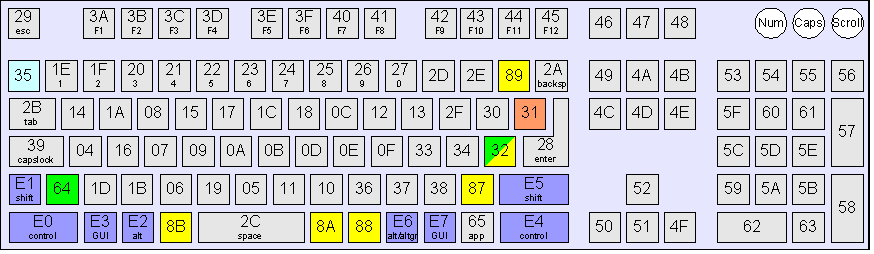
| Keyboard Model | HID codes unique to this keyboard | HID codes missing on this keyboard | US | 0x31 (backslash/vertical bar) |
0x32, 0x64, 0x66-0xDF |
EU | 0x32 (near enter key; symbols vary)0x64 (near left shift key; symbols vary) |
0x31, 0x66-0xDF |
Japan | 0x32 (right bracket/right brace)0x87 (backslash/underline/ro/broken bar)0x88 (katakana/hiragana)0x89 (yen/vertical bar)0x8A (henkan)0x8B (muhenkan)0x94 (see note below) |
0x31 (see note below)0x64 |
Note:
0x31 in place of code 0x32, as well as code 0x94 in place of code 0x35 (hankaku/zenkaku/kanji, light blue  key above). These keys are remapped to their expected values internally in the KBD Driver.
0x92 (katakana) and 0x93 (hiragana) are defined in the HID specification, we have not yet observed any keyboards that transmit these codes. . They are assigned the above codes within the KBD driver.
For a description of individual HID codes, refer to kbd_hid_codes.h; for keyboards at http://www.usb.org/developers/hidpage/, refer to the HID Usage Table .
To avoid these irregularities, an application key callback should perhaps immediately translate HID key codes into KBKUnicode values using the KBDTranslateHidCode function. There are few situations in which raw HID key codes are absolutely required.
When mapping user input to key presses, an application designer must consider whether multiple keys may be pressed simultaneously and whether a keyboard can recognize such key presses without problems. If three or more keys are pressed simultaneously, a problem known as "ghosting" may occur. This problem will cause keyboard keys that are not being pressed by the user to be perceived as key presses. Also, some multiple key combinations may be undetectable by the keyboard electronics. Different keyboards will have different issues with multiple key presses. For most normal keyboard input, this should not be a problem. It may be a problem when you attempt to use the keyboard as a controller pad, or when you try to detect an unsupported combination of modifier keys.
First, you must call KBDInitRegionUS, KBDInitRegionJP, or KBDInitRegionEU to set up the keyboard maps for the appropriate region. As long as one of these functions is always called, calling multiple functions does not pose a problem. A callback handler may be registered before calling the KBDInit function. Finally, call KBDInit to initialize the KBD library.
Once callbacks have been registered, keyboard events will result in interrupts and the appropriate application callback will be called. Note that since callbacks run with interrupts disabled, they should not do anything that requires a significant amount of time. If necessary, they can trigger a thread to handle any procedures that cannot run with interrupts disabled.
Alternately, you may call a synchronous API to examine keyboard input. The synchronous API should be called frequently enough to prevent queue overflow. It may be a good idea to call this API in a loop until it returns with a null key value.
To exit the KBD library, KBDExit should be called. When this function is called, registered callbacks are invalidated and keyboard events will be ignored. It is recommended that all keyboard LEDs be turned off before calling the KBDExit function. When the OS shuts down or resets, it will normally try to turn off all keyboard LEDs, but it cannot do this if KBDExit has been called.
You must be careful when using the KBD library to avoid sending too many USB messages. If you saturate the USB bus, you may prevent other devices (such as the Wii Remote) from using USB, and you may also prevent key presses from getting through.
The following functions may result in a call that sends an LED message over USB:
For more details, refer to the documentation for these commands.
These are the current limitations for keyboard support.
KBDKeyEvent.2007/07/10 Initial version.
CONFIDENTIAL