Initial Velocity Information
You can set detailed initial velocity information for a particle.
This page describes the following features.
Spread out from y-axis
Spread out from origin
Random direction
Specified direction
Specified random direction
Randomize results
Spread out from y-axis

-
Deletes this initialization panel.
This operation removes the Spread out from y-axis setting from the list box as well.
-
Sets whether to enable settings made on this panel.
-
Sets whether to copy resources.
-
Sets dispersion velocity.
Spread Out from Origin
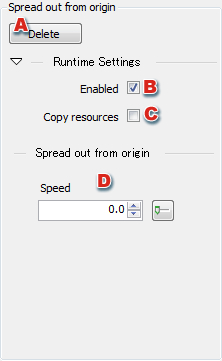
You can edit the value used for Spread out from origin on this panel.
-
Deletes this Spread out from origin panel.
This operation removes the Spread out from origin setting from the list box as well.
-
Sets whether to enable settings made on this panel.
-
Sets whether to copy resources.
-
Sets dispersion velocity.
Random Direction
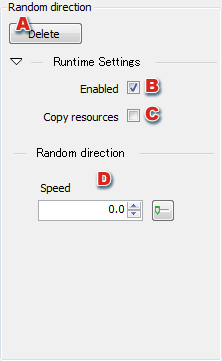
You can edit the value used for Random direction on this panel.
-
Deletes this Random direction panel.
This operation removes the Random direction setting from the list box as well.
-
Sets whether to enable settings made on this panel.
-
Sets whether to copy resources.
-
Sets the velocity in the random direction.
Specified Direction
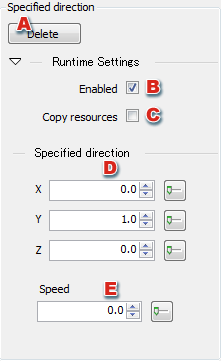
You can edit the value used for Specified direction on this panel.
-
Deletes this Specified direction panel.
This operation removes the Specified direction setting from the list box as well.
-
Sets whether to enable settings made on this panel.
-
Sets whether to copy resources.
-
Sets the vector in the specified direction.
-
Sets the velocity in the specified direction.
Specified Random Direction
You can edit the value used for Specified random direction on this panel.
-
Deletes this Specified random direction panel.
This operation removes the Specified random direction setting from the list box as well.
-
Sets whether to enable settings made on this panel.
-
Sets whether to copy resources.
-
Sets a vector in the Specified random direction.
-
Sets the velocity in the Specified random direction.
-
Sets how much randomness to apply to the direction within a certain angular range.
Randomize Results
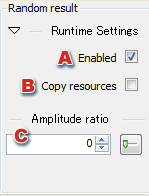
-
Sets whether to enable settings made on this panel.
-
Sets whether to copy resources.
-
Sets the Amplitude ratio to use for randomization.
CONFIDENTIAL