Detailed Vertex UV Rotation Information
You can set detailed information for varying the vertex UV rotation of particles.
This page describes the following features.
Animations
Overwrite previous value
Animations
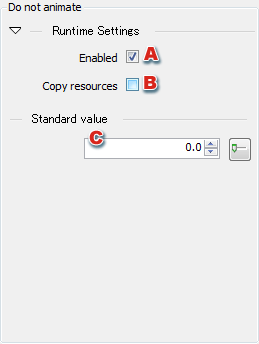
This panel appears when Do not animate has been selected in the Animation combo box.
-
Sets whether to enable settings made on this panel.
-
Sets whether to copy resources.
-
Sets the standard value for vertex UV rotation.
Overwrite previous value
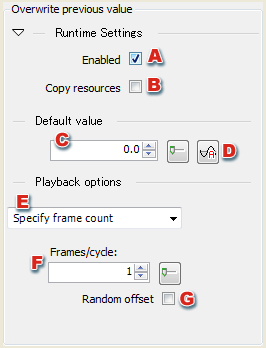
This panel appears when Overwrite previous value has been selected in the Animation combo box.
-
Sets whether to enable settings made on this panel.
-
Sets whether to copy resources.
-
Sets the default.
-
Opens Curve Editor
-
Sets the sync type for playback options.
-
Sets the number of frames per loop cycle when Specify frame count is selected for Playback Options.
-
Sets whether to use a random offset when Specify frame count is selected for Playback Options.
CONFIDENTIAL