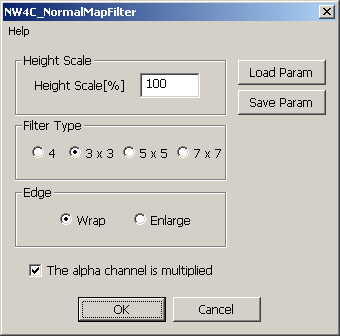
This plug-in creates normal maps from bumps and depressions in an image by treating image brightness as an indication of height. Color images can also be processed.
Select all channels and execute [NintendoWare for CTR] > [NW4C_NormalMapFilter...] on the [Filter] menu.
A scale value for adjusting the height of bumps and depressions can be set in the [Height Scale] parameter. In units of %. Increasing this value emphasis bumps and depressions.
The [Filter Type] parameter sets the filter type. The larger the value the greater the range sampled. The initial value is [3x3].
The [Edge] parameter specifies image edge processing. Selecting [Wrap] wraps edges. Selecting [Enlarge] stretches edge pixels. The initial value is [Wrap].
The [The alpha channel is multiplied] parameter specifies whether to multily the alpha channel by the height map.
ON multiplies the alpha channel by the height map. OFF does not multiply the alpha channel by the height map. No multiplication is performed if there is no alpha channel even if this parameter is turned ON.
Press the [Load Param] button displays a file selection dialog. The selected configuration file is loaded and used to set current parameters.
Pressing the [Save Param] button displays a file selection dialog. Current parameters are saved in the specified configuration file.
Image mode can only be executed when RGB color is used.
Executing on files that use 16 bits per channel is impossible.
If there is more than one alpha channel, information for the topmost alpha channel in the channel window is used for height map multiplication.
Select an RGB channel and execute.
Correct processing does not result if executed with only an alpha channel selected.
Processing is performed on selected layers.
Processing can also be applied to mipmap images.
CONFIDENTIAL