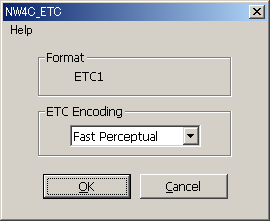
Thsi filter causes display in ETC format.
Select all channels and execute [NintendoWare for CTR] > [NW4C_ETC...] on the [Filter] menu.
The format being applied (ETC1 or ETC1_A4) is displayed in Format. ETC1_A4 results if an alpha channel is selected or a layer including transparent pixels is selected. ETC1_A4 also results if the width or height of the image is 16 or less. (This is determined based on the width or height of the smallest image in the case of a mipmap.) The compression method is selected using ETC Encoding.
Fast, Medium, and Slow indicate the calculation speed for compression. The slower the calculation speed, the better the image quality.
Methods that include Perceptual compress so the error is smallest for the green (G) component, which is the most easily detectable component by the human eye. We recommend a method that include Perceptual when dealing with normal map textures.
Clicking the [OK] button creates the MIP map image.
Image mode can only be executed when RGB color is used.
Executing on files that use 16 bits per channel is impossible.
Execution is only possible if the height and width of the image are powers of two equal to or greater than 8 and equal to or less than 1024.
This can also be executed on mipmap and cubemap images.
If an alpha channel is present, be sure to execute under the status selected for all channels as given by Shift + left clicking. Execution is impossible if more than one alpha channel exists.
If there is more than one visible layer, combine them first and then execute.
If the image includes only layers and no background and there is no alpha channel, the transparency of pixels is processed as the image's alpha.
If an image has not been touched since the last time the ETC filter was applied, a warning dialog box will be displayed if the filter is applied a second time. Click the [Yes] button to continue or the [No] button to cancel.
Follow the procedure given below when creating MIP map images to which an ETC filter has been applied.
CONFIDENTIAL