Vertex lighting Properties panel
The vertex lighting Properties panel is used to edit vertex lights created using CreativeStudio.
Vertex Lighting Properties Panel Settings and Features
This page describes vertex lighting Properties panel settings and features.
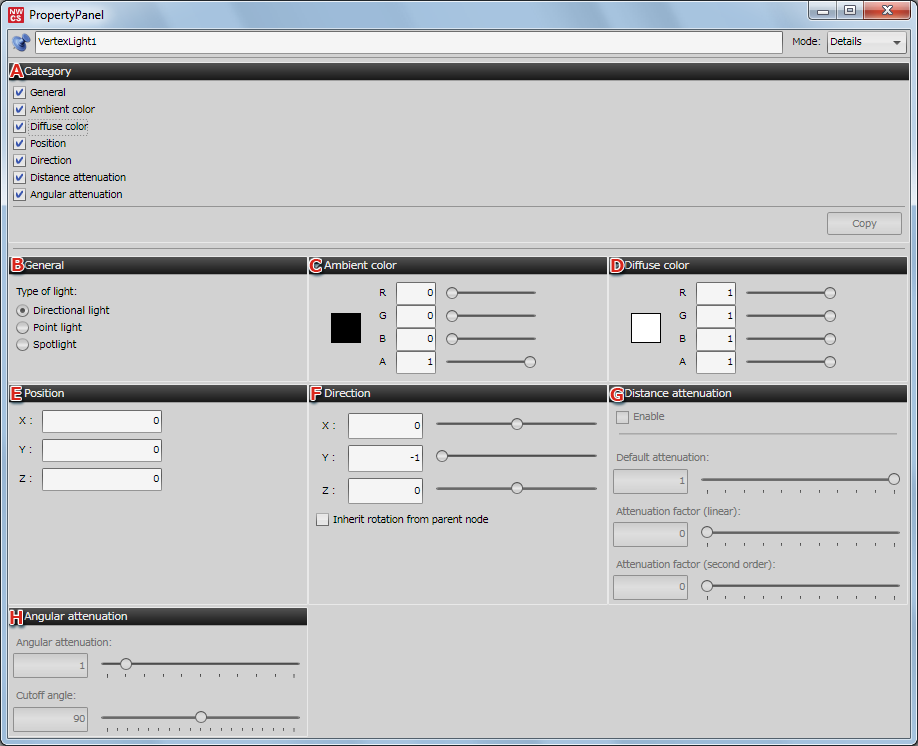
| A | Categories | Allows you to show/hide settings used in the vertex lighting Properties panel. |
|---|---|---|
| B | General | Here you can set the type of vertex light. Mark or clear the checkbox to enable/disable the vertex light. |
| C | Ambient color | Allows you to set the ambient color for the vertex light. |
| D | Diffuse color | Allows you to set the diffuse color for the vertex light. |
| E | Position | Allows you to set the position of the vertex light in terms of X, Y and Z. |
| F | Direction: | Allows you to set the direction of the vertex light in terms of X, Y and Z. If the light has a hierarchical structure, sets whether to inherit rotation from parent node. |
| G | Distance attenuation | This option is enabled when the type of light is Point light or Spotlight. Using Distance attenuation allows you to set the distance between the model and light. |
| H | Angular attenuation | This option is enabled when the type of light is Spotlight. The light angle versus the model can be set using Angular attenuation and Cutoff angle. |
| I | User Data | Sets optional data used by the game developer. The data set here is passed as-is to the application, and is not used by CreativeStudio. |
Note: The Distance attenuation and Angular attenuation settings are turned off by default. Be sure to select the appropriate checkboxes when using these features.