Blender
Under Blender, you can select preset render settings and render layer settings from selected from a pull-down menu.
You can also enable/disable the use of fog.
Blender Settings and Features
This page describes Blender settings and features.
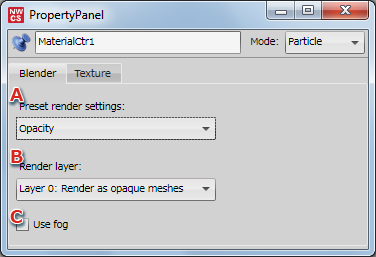
| A | Preset render settings | Select preset render settings from the pull-down menu. |
|---|---|---|
| B | Render layer | You can control the rendering order and set the type of render layer. You can set the type of rendering layer for the graphics by selecting from the pull-down menu. |
| C | Use fog | Select the checkbox to use fog. |
Caution:
Custom is selected automatically if the material settings do not match any of the available selections.
Nothing happens if Custom is manually selected from the pull-down menu.