Light Set
This window displays light sets configured for a scene.
Settings for adding and editing light sets are made on the Add/edit light set dialog.

- Add, delete, or edit light sets for a scene.
- Displays light sets configured for a scene.
Add/Edit Light Set Dialog
Settings for adding fragment lights and/or vertex lights are made on the 、Add Light dialog.
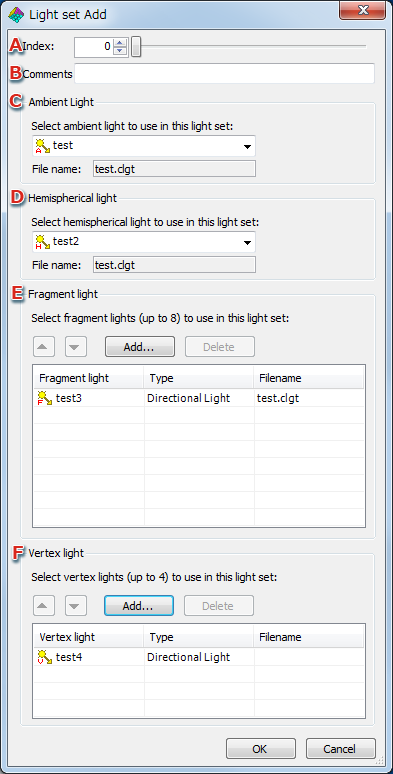
- Set the number of the light set to be created.
An error dialog is displayed if the number set is being used by another light set.
- Attaches a comment to the light set.
- Select the ambient light to be used by the light set from the pull-down menu.
Displays the file name of the selected ambient light.
- Select the hemispherical light to be used by the light set from the pull-down menu.
Displays the file name of the selected hemispherical light.
- Up to eight fragment lights can be added for use by the light set.
Pressing Add opens an Add Light dialog, where you can select the fragment light to be added.
- Up to four vertex lights can be added for use by the light set.
Pressing Add opens an Add Light dialog, where you can select the vertex light to be added.
Add Light Dialog

- Select the lights to add.
CONFIDENTIAL