Preview
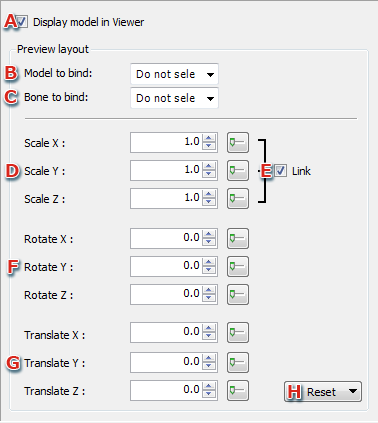
- You can choose whether to display the model on the Viewer here.
- Specifies the model to be bound under the Viewer from a pull-down menu.
When selected, this will be displayed in the coordinate system of the bound model.
- Specifies the model bone to be bound under the Viewer from a pull-down menu.
When selected, this will be displayed in the coordinate system of the bound model bone.
- Scale
Sets whether to directly input a numeric value or use the Slider Window to set the scale of the model to be previewed.
- Sets whether to link and modify the XYZ components of the scale.
- Rotate
Configures the rotation angle of the model to be previewed. Rotation is calculated in the order of x-, y-, and z-axes.
This settings can be made using direct numeric input or the slider window
- Translate
Configures the amount of translation for the model to be previewed.
This settings can be made using direct numeric input or the slider window
- Reset
Selects an item and resets its settings.
CONFIDENTIAL