The Preview features operate on SoundMaker to configure settings in the same way controllers are used in the various windows of Viewer and SoundPlayer. The features comprise various windows and panes that can be operated on SoundMaker to send settings to Viewer for playback on a console, to reflect settings in PC emulation playback, and to save settings.
The features correspond to the various settings in the SoundArchivePlayer, SeqVariable, and Effect windows and to some settings in the SoundSystem window.
Note: The Viewer feature has not been implemented yet.
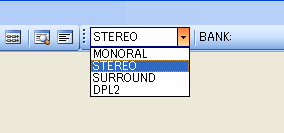
Included among the Preview items in the toolbar is the OutputMode drop-down list, which switches the OutputMode in the same way as the Viewer.
There are several ways to play sounds from SoundMaker, including using the options included in the main window's Preview menu, its toolbar buttons, and from the Preview Player window, as well as computer keyboard shortcut keys.
Note also that the playback operations differ slightly between the Sound Set tab and the Bank tab.
On the Sound Set tab, operations are performed on sounds selected from each list.
In the Bank tab, operations are performed on the active bank tab instruments.
After selecting a sound from each list, from the main window's Preview menu you can use the Play, Pause, and Stop options as well as the toolbar buttons.
Sounds can also be played back by double-clicking on a list, by clicking the "Play" button next to each item in the list, or by pressing the F9 key. Playback can be stopped by pressing the F10 key.
The shortcut keys and their operations are shown below
|
Input |
Operation |
| F9 | Play |
| F10 | Stop All |
| SPACE | Play |
| Clicking the "Play" button | Play |
Note: To learn about operations in the Bank tab, see GUI-based instrument playback.
CONFIDENTIAL