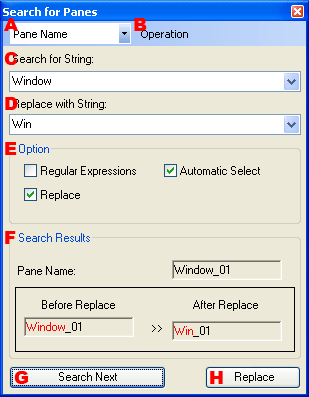
Searches for panes that are in the layout.
-
Specifies the type of the search target character string.
Can be specified as the pane name, user information, or comment.
-
Executes the operations available in the Search window.
- Search Next
- Searches for the next candidate.
- Search Previous
- Searches for the previous candidate.
- Replace
- Performs replace operations with the current conditions.
- Add to Selection
- Adds the search results to the search pane set.
- Select All
- Selects all panes conforming to the search.
-
Enter the search string. If the Regular Expression option is selected, input a regular expression.
-
Enter the replacement string. The Replace option must be specified.
-
Specifies the search options.
- Regular Expression
- Use regular expressions to specify the search string.
- Automatic Select
- Selects panes matching the search.
- Replace
- Replaces strings that match the search string.
-
The search results are displayed.
- Pane name
- The name of the pane matching the search character string is displayed.
- Before Replace
- Displays the string before performing the replace operation. The part that matches appears in red.
- After Replace
- Displays the character string after performing the replace operation. The part that was replaced appears in red.
-
Searches for the next candidate.
-
Performs replace operations with the current conditions.