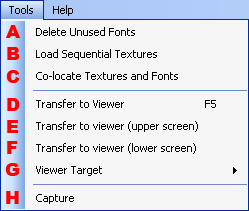
Deletes font resources not used in the layout.
Loads consecutive textures and creates a texture pattern animation pane.
The Load Sequential Textures dialog will be displayed.

All textures and fonts used in the layout are copied to the specified folder. All reference paths in the layout are changed to the copy destination.
The Co-locate Textures and Fonts dialog box will be displayed.

Previews data using Layout Viewer.
Sends the layout data to the viewer screen (upper, lower) specified as the transfer destination in the Tool Environment Settings.
(The viewer itself is specified as the transfer destination by specifying Viewer Target.)
Previews data using Layout Viewer.
Sends to the upper screen of the viewer.
Previews data using the Viewer.
Sends to the lower screen of the viewer.
Specifies where the viewer will run.

Checkmark to specify use of the layout viewer running on the PC, or the simple layout viewer on the test unit.
Performs a screen capture of the Layout window.
Saves it as a bitmap file (.bmp) in the Project folder.
CONFIDENTIAL