Overview
LayoutEditor is a Windows application for editing 2D layouts of the type used for game title screens and menu screens under NintendoWare for Revolution (referred to in the documentation as NintendoWare).
Here we provide an overview of LayoutEditor and describe its main features.
About LayoutEditor
LayoutEditor allows you to load image files and create and edit 2D layout screens. Various animation effects can also be applied to the layout data created. Created data can be previewed using the Viewer that runs on the Wii console.
Positioning of LayoutEditor
The following figure shows the positioning of LayoutEditor, its relationship with other tools, and the data flow within NintendoWare.
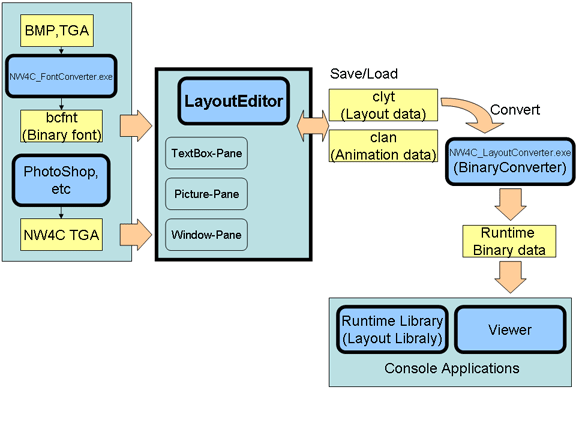
LayoutEditor Features
Main Features and Characteristics
The main features and characteristics of LayoutEditor are shown below.
- Loading and laying out image files
- You can load image files (in the TGA format with additional NW4C information) and create layout data for game screens.
- Arranging character data that uses NW4C font files
- You can load NW4C font files and arrange character data.
- Editing sophisticated material representations
- You can edit sophisticated material representations that use CTR-specific features on arranged images.
- Editing animations
- It is possible to set and edit various animation effects for created layout data.
(SRT animations, visibility animations, texture SRT animations, texture pattern animations, material color animations)
- Editing properties specific to game screen layouts
- Supported features for widescreen layouts User information. It is possible to set and edit properties unique to game screen layouts such as editing boundary condition areas.
- Preview
-
You can transfer LayoutEditor content to Layout Viewer to check how layouts and animations display on the emulated game system.
- Binary File Output
- It is possible to run the binary converter to output binary files to be processed at run time on the Wii.
Things You Cannot Do with LayoutEditor
The following actions cannot be performed with LayoutEditor:
- Create new image files (such as TGA files with additional information)
-
New image files cannot be created.
You need to create them separately using image-editing software.
CONFIDENTIAL