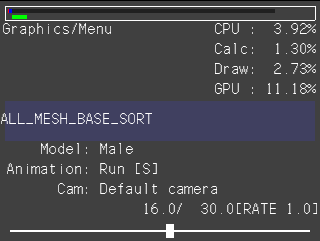
The following menu screen can be opened by pressing the Left/Right Button while holding down the START button when using a unit controller, or by pressing the Left/Right Button while holding down the PLUS Button when using a debugging pad.
With Viewer, you can change various Viewer settings from this menu screen.
Even if the lower screen is being hidden, it will be forcibly displayed when the menu screen is shown.
| Key Operations | Description |
| +Control Pad Left/Right | Increments or decrements the value of the cursor position item. |
| A Button | Selects an item. |
| Key Operations | Description |
| +Control Pad Left/Right | Increments or decrements the value of the cursor position item. |
| A Button | Selects an item. |
CONFIDENTIAL