Select the Bank node in the project tree to show the banks in the Sound Set tab.
The displayed list is called the bank list.
Banks reference bank files. The instruments actually voiced by sequence sounds are defined in bank files.
Bank files are edited in the Bank tab (explained later).
To create or add a bank, select the list region in the Sound Set tab and then select Project → Add Item → Bank....
You can also create and add banks using the shortcut menu that appears when you right-click the bank list.
Banks are edited in the bank list.
As described in the section on banks and bank files, sounds themselves are defined in bank files that are referenced by banks. The only editing performed on the bank list is editing a bank name and the bank files that are referenced.
This section describes the meaning of each of the elements of a bank list.
Specifies the name of the bank. There are restrictions on the characters that can be used in a name. The following characters can be used.
- The first character must be a single-byte letter or an underscore. [a-zA-Z_]
- Other characters must be single-byte alphanumeric or an underscore. [a-zA-Z0-9_]
Used to configure which waveform archive a given bank is associated with (in other words, chooses the waveform archive you want to share).
Specifies the path name of the bank file.
There are restrictions on the characters that can be used in a file name or path name. The following characters can be used.
- The first character of a file name must be a single-byte letter or an underscore. [a-zA-Z_]
- Other characters in a file name must be single-byte alphanumeric or an underscore. [a-zA-Z0-9_]
You can output instrument lists to an HTML-formatted file in the same way as HTML sound list output.
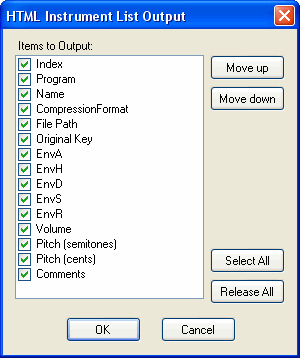
Right-click the bank list to open the shortcut menu and select HTML Instrument List Output to display the Settings dialog box.
Select the items to output and export the file.
Unlike HTML sound lists, this will not be output while converting. HTML instrument lists are output to the same directory as each bank file. You can view the instrument label names and comments in a list, and sort the instruments using each item as a filter.
CONFIDENTIAL