Particle Effect Content
This section provides details about the three kinds of content that comprise particles effects: the particle emitter, the particle model and the particle set.
Particle Emitter
Particle emitters are sources that generate and emit particles. They can be created in the particle emitter panel, which lets you set their shape, size, direction, and position. The shape, size, direction, and position of a particle emitter only have an effect when particles are being emitted.
The term particle refers to a system that can generate multiple "shapes" and control their shape, color, and movement as a group. Games use particles for effects like fire and water.
Particle Emitter Settings
Use the following settings to configure a particle emitter.
| Setting | Description |
|---|---|
| Position | A particle emitter's Scale / Rotate / Translate. |
| Emission | Emission volume Emission volume randomization (%) Emission interval Emission interval randomization (%) |
| Emission Time | Infinite checkbox Emitter shape |
Emitter Shape
CreativeStudio can work with the following six emitter shapes. Different shapes emit particles differently.
| Emitter Shape | Description |
|---|---|
| Point | Particles are emitted from a single point. Does not have any size or orientation settings. |
| Disc | Particles are emitted horizontally from a disc. |
| Sphere | Particles are emitted outwards from inside a sphere. |
| Cylinder | Particles are emitted outwards from inside a cylinder. |
| Rectangle | Particles are emitted outwards from inside a rectangle. |
| Cube | Particles are emitted outwards from inside a cube. |
Configuration Options for Emitter Shapes
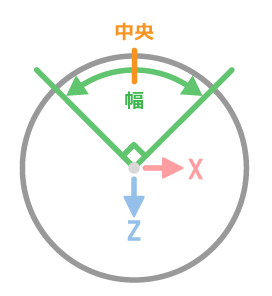
Center and Width
This option is enabled for disk, sphere, and cylinder emitter shapes. The emitter's shape as viewed from above along the Y axis can be turned into an arc.
The figure below shows use of the Center and Width setting to specify the range in which particles are generated, using sample setting values.
Sample Configuration
- Emitter Shape: Disk
- Center: 0 degrees
- Width: 90 degrees
Fixed at Center
At the present time, this setting is only enabled for disk-shaped emitters.
By anchoring the emitter at the center, you can make sure that particles are always emitted in the same locations.
The figure below shows the Fixed at Center setting turned on and also off, using sample setting values.
Sample Configuration
- Emitter Shape: Disk
- Emission volume: 4
- Center: 0 degrees
- Width: 360 degrees
- Hollowness: 100 %
- Fixed at Center: On/Off

Equally Spaced
At the present time, this setting is only enabled for disk-shaped emitters. By equally spacing where particles are emitted, you can keep particles from overlapping.
The figure below shows the Equally Spaced setting turned on and also off, using sample setting values.
Sample Configuration
- Emitter Shape: Disk
- Emission volume: 4
- Center: 0 degrees
- Width: 360 degrees
- Hollowness: 100 %
- Equally Spaced: On/Off

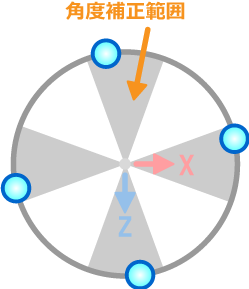
Angular Correction
At the present time, this setting is only enabled for disk-shaped emitters.
Adds correction to slightly randomize particle emission locations. Equally spaces particle emission intervals, while also somewhat randomizing emission locations.
The figure below shows the effects of adding an offset to particle emission locations and applying 40-degree angle correction.
Sample Configuration
- Emitter Shape: Disk
- Emission volume: 4
- Center: 0 degrees
- Width: 360 degrees
- Hollowness: 100 %
- Angular Correction: 40 degrees
- Fixed at Center: ON
- Equally Spaced: ON
Particle Model
A particle model is analogous to a graphics model. The size, direction, and position all affect an entire particle set after the particles have been emitted.
Particle models are always above particle sets in the object hierarchy.
Particle Model Settings
Use the following settings to configure a particle model.
| Setting | Description |
|---|---|
| General | Enables/disables a particle model, and enables or disables display. |
| Position | Changes the particle model position in terms of Scale / Rotate / Translate. |
| Render priority | Sets the render priority of the particle model. |
| User Data | Sets optional data used by the game developer. The data set here is passed as-is to the application, and is not used by CreativeStudio. |
Particle Set
A particle set is a group of particles that all have the same shape.
A shape is a group of polygons that can be previewed as a shape using CreativeStudio.
A single material can be configured for each shape.
Particle Set Settings
The following items can be set for particle sets:
| Setting | Description |
|---|---|
| Particle shape | Sets the shape of particles from when they are emitted until they expire. You can also select whether particles should be rendered in the order emitted, or in the opposite order. |
| Lifespan | Specifies the particle duration from emission until expiration. |
| Particle Orientation and Size | Set by the scale and rotation. |
| Particle Color and Transparency | Sets the color and alpha. |
| Particle Animation | Can configure the particle animation. |
| Child particles | Can configure child particles. |
Particle shape
CreativeStudio can configure the following four particle shape types.
| Setting | Description |
|---|---|
| Screen-Aligned Billboard | Rotates the particle's Z axis so it is parallel with the viewpoint. Particles on the edge of the angle of view are parsed. |
| World-Oriented Billboard | Keeps the particle's Z axis parallel to the viewpoint, and keeps the particle's Y axis always vertical so the Z axis does not tilt. Particles on the edge of the angle of view are parsed. |
| Y-Axis Billboard | Rotates the Y axis to keep it facing straight at the camera. Particles on the edge of the angle of view are parsed. |
| Polygon Plane (XY) | A rectangular polygon model. |
The material used in particle effects is the same used in graphics.