Material Pipeline
This section describes the pipeline (the flow) in which the the data configured in the CreativeStudio material Properties panel are used by the hardware.
Material Pipeline Diagram
The hardware processes polygon model data and texture image data according to the parameters set in the CreativeStudio Properties panel for materials and displays the result on the screen.
The figure below shows the process flow in the hardware.

A buffer is a memory region where information can be temporarily stored and retrieved while processing is taking place.
Since different kinds of information are handled by different buffers, the buffers are named to reflect which kind of information they handle.
Description of Pipeline Elements
This section describes each of the pipeline elements along with the process flow in hardware.
Vertex Buffer
The vertex buffer is a region of memory used to store vertex attribute information included in a polygon model.
It is used by thevertex shader and the geometry shader.
Vertex Operations (Vertex Shader)
Vertex operations apply lighting and shading to individual vertices based on information and vertex attributes from the vertex buffer.
The process is also called the vertex shader.
Vertex shader processing is complete at this stage.
Triangle Setup and the Rasterizing Process
This data processed by the vertex shader and geometry shader are passed through the triangle setup process and the rasterizing process and converted into data for fragments.
The following figure is an image that depicts polygon assembly and per-fragment correction by the rasterizing process after shading has been applied by the vertex process.
The quality of the lighting result is affected by polygon density.
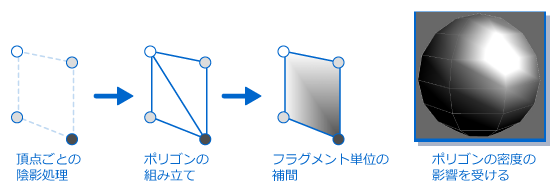
During triangle setup, vertex data is converted to optimal conditions.
Vertex information is linked by a more efficient method and configured as a polygon model.
Texel Operations
Texel operations compute the correspondences between the texture coordinates that were input from the vertex shader and the image that was input from texture memory.
The table below lists the texel operations done with CreativeStudio.
Applying changes visible to the eye
| Type | Description |
|---|---|
| Attach image | Attaches an image to a polygon surface and applies changes visible to the eye. |
| Mipmaps | Uses a special texture. The optimal resolution is automatically selected based on the area projected on the screen when graphics having different resolutions exist together in a single texture image. |
Related to texture coordinate mapping
| Type | Description |
|---|---|
| Camera cubic environment | Uses a special texture as one environment map. The surrounding image is seen to be reflected in all directions of the object. |
| Camera spherical environment | Uses a special texture as one environment map. The surrounding image is seen to be reflected in parts of the object that can be seen from the viewpoint. |
Applying effects to normal vectors of polygons
| Type | Description |
|---|---|
| Bump map | Uses a special texture. Shading is expressed by applying a weight to the normal vector on each color channel of the image. |
| Tangent map | Uses a special texture. Highlighted shapes are warped by applying a weight to the tangent on each color channel of the image. |
Fragment lighting
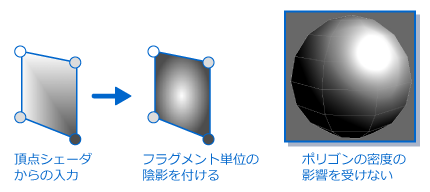
Fragment lighting is a process that applies shadows on a per-fragment basis to information output from the vertex process. More complex lighting expressions are possible using lookup tables.
The figure below shows shading applied to fragments for interpolated normal vectors provided as input values from the vertex shader. The quality of the lighting result is not affected by the polygon density.
Texture combiners
The texture combiner is the fragment shader process by which the results of the vertex shader, fragment lighting and texel operations serve as the input values that get blended to output the final color and alpha values. The input values used by the texture combiner are called input sources.
The figure below depicts the process flow from the input of the fragment lighting result, texture color, vertex color and constant color serving as input sources, to the result of blending by the texture combiner that will be passed to the blending process.

Constant color refers to the fixed color and alpha values that can be used for the combiner computational expressions of the texture combiner. Up to six Constant Colors can be set (constant 0 to constant 5), and one can be selected as the input source for each step in the texture combiner. You can also animate these using animation curves.
The Blend Color used in the Blend process is set separately.
Fog
Fog is the name of a feature that is used to represent atmospheric effects like mist and steam. This feature changes the color of objects based on their distance from the screen. The distance (aka "depth value") is calculated on a per-fragment basis.
Lookup tables can be used to determine the degree of attenuation over distance.
Blender
The Blender performs a series of processes on the created fragment information, starting by loading information from the framebuffer and ending by writing data back to the framebuffer.
The blender decides whether to write a fragment to the framebuffer depending on the outcome of a write test. Fragments that pass the test are blended with any fragments already in the framebuffer in the same location, then writes this back to the framebuffer.
Write Test
The write test takes generated fragment information as a reference value and determines whether to actually write it to the framebuffer. This is carried out for each fragment. Specify the standard by which to judge fragments in CreativeStudio. Fragments that do not meet the standard are excluded from rendering.
The table below lists the conditions by which a fragment is judged during blending.
| Conditions | Description |
|---|---|
| Alpha test | An alpha test compares a fragment's alpha value with the reference value set for the alpha test. |
| Stencil test | A stencil test compares the value set for the fragment stencil test with the value in the stencil buffer to write to. If the fragment passes, the value in the stencil buffer is overwritten with the fragment value. |
| Depth test | A depth test compares the per-fragment depth value indicating the distance from the camera with the value in the depth buffer to write to. If the fragment passes, the value in the depth buffer is overwritten with the fragment value. |
Write tests are carried out in order of alpha test → depth test → stencil test.
Write to Framebuffer
Write to Framebuffer is a process that blends the information for the fragments that will be used as determined by the write test with the information for fragments located at the same position in the framebuffer, and then writes the result of blending back to the framebuffer.
The table below lists blending methods when writing to the framebuffer.
| Blending Types | Description |
|---|---|
| Blending | Performs blending using a blend formula by multiplying the value set here times the color of the fragment to be newly written and the color in the framebuffer to be written and then writes the result to the framebuffer. |
| Logical Operations | Peforms logical operations on the color of the fragment to be newly written and the color in the framebuffer to be written and then writes the result to the framebuffer. |
The fragment shader process is complete upon writing to the framebuffer.
Framebuffer
The framebuffer is a memory region for temporarily storing data output from the fragment shader.
Values for fragments for which processing by fragment using the blender has ended are stored here.
The table below gives an overview of the three buffers that collectively make up the framebuffer.
| Buffer Type | Usage |
|---|---|
| Color Buffer | Renders fragment values that contain color and alpha values. |
| Stencil Buffer | Stores information that limits the area being rendered. This is used during stencil tests. |
| Depth Buffer | Stores information about the depth from the camera. This is used during depth tests. |
The fragment value in the framebuffer is used by the blender process of CreativeStudio.