Fragment lighting
This section describes fragment lighting.
What is Fragment Lighting?
Fragment lighting is a process that applies shadows on a per-fragment basis to information output from the vertex process. More complex lighting expressions are possible using lookup tables.
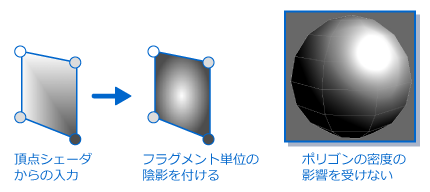
The figure below shows shading applied to fragments for interpolated normal vectors provided as input values from the vertex shader. The quality of the lighting result is not affected by the polygon density.
The following figure shows the process flow up to the output of the primary color and secondary color that results from performing lighting calculations with the settings made for lights and materials based on the information input from the vertex process.

Primary Color and Secondary Color
When using fragment lighting, lighting calculations are performed by taking information from the vertex shader as input values. The result is output as two types of color information: primary color and secondary color
Primary color
Primary color refers to the ambient and diffuse components resulting from polygon model lighting.
Ambient refers to the color used for shadows when light strikes an object. This is used to express the light reflected off other objects and light coming around the shaded side of an object. This is also called environmental light.
Diffuse refers to the color of an object surface that changes due to the intensity and angle of incidence of light as it strikes the object.拡散光とも呼ばれます。
Secondary color
Secondary color refers to the specular component resulting from polygon model lighting. A lookup table can be used to calculate specular light.
Specular is the highlight seen on shiny objects when illuminated. By using lookup tables you can express a range of effects, for example showing weak light as spreading and strong light as concentrated in a small point.
This is also called surface reflected light.
Lookup tables represent curves for which input and output has been set. Output values are pre-set for 256 input values. Tables are then used to calculate lighting or fog.
The figure below shows how a lookup table works.

Fragment Lighting Settings
This section describes settings for lights and materials when performing per-fragment lighting.
Light Settings
The table below lists the items which can be set for each type of light.
| Category | Item | Description |
|---|---|---|
| Light color | Ambient color (environment light) |
The color and alpha values for the light that will effect the ambient color of the material. Set with Fragment lighting. |
| Diffuse color (scattered light) |
The color and alpha values for the light that will effect the diffuse color of the material. Set with Fragment lighting. | |
| Specular color 0 (surface reflected light 0) |
The color and alpha values for the light that will effect the specular color 0 of the material. Set with Fragment lighting. | |
| Specular color 1 (surface reflected light 1) |
The color and alpha values for the light that will effect the specular color 1 of the material. Set with Fragment lighting. | |
| Light orientation | Position | The light position. For fragment lighting, this is set in the world coordinate system. |
| Direction | The light direction. For fragment lighting, this is set in the world coordinate system. By combining the nodes and hierarchies of animations you can inherit values from the top level. | |
| Light attenuation factors | Distance attenuation | Specifies how far the light will reach in terms of an attenuation rate Used for point lights and spotlights. |
| Spotlight attenuation | Specifies how wide the light will reach in terms of an attenuation rate using a lookup table Used for spotlights. | |
| Highlight adjustments | Geometric factor | Adjusts how specular is entered. Enabled/disabled depending on the material settings. |
Type of usable lights
The figure below depicts the kinds of lights that can be used for fragment lighting, and how light spreads from each kind of light.
The more lights you use, the greater the processing load for that fragment.

Ambient light
Ambient light is light that shines evenly on the entire polygon model. For this reason, the light has no parameters for items like direction and attenuation.
Material Settings
The table below lists parameters that can be set for each material.
| Category | Item | Description |
|---|---|---|
| Material color | Emissive color |
The overall color illuminating the object. This is set in a material. |
| Ambient color |
Color expressing the shaded side of the object. This is set in a material. | |
| Diffuse color |
Color expressing the surface "feel" of the object. This is set in a material. | |
| Specular color 0 |
Color expressing object highlights. This is set in a material. | |
| Specular color 1 |
Color expressing object highlights. This is set in a material. | |
| Environment light of entire scene | Global ambient color | Color expressing the ambient light that is blending of all objects in the scene. Set in a fragment light. |
| Light Controls | Distribution 0 | Uses lookup table to control highlight shape of Specular color 0. |
| Distribution 1 | Uses lookup table to control highlight shape of Specular color 1. | |
| Reflection | Uses lookup table to control the RGB color components of specular color. | |
| Fresnel | Uses lookup table to control the Alpha component of specular. |
Material color
Material color refers to the polygon model color required for fragment lighting calculations. Five colors can be set.
The figure below shows the position of each material color when light is shined on a spherical model from the upper-left direction.

Geometric factor
Geometric factor is a feature for adjusting how the specular appears. Using this feature, specular can be made to appear weak when it comes from the front of the view direction, and strong when it comes from the side.
Geometric factor 0 affects Specular color 0, while Geometric factor 1 affects Specular color 1.
In the figure below, the changing position of light is used to explain the difference in appearance when the Geometric factor feature is applied.

Distribution (The shape of the specular component)
Distribution is the element used to apply changes to the shape of the specular as a secondary color calculation. A lookup table is used to set the distribution.
Distribution 0 affects Specular color 0, while Distribution 1 affects Specular color 1.
The following figure shows how the specular shape is controlled using a lookup table.

Reflection
Reflection is the element used to control the specular color as a secondary color calculation. A lookup table is used to set reflection.
The following figure shows how the specular color is controlled using a lookup table.

Fresnel
Fresnel is an element used to control material transparency (alpha value) as a secondary color calculation. A lookup table is used to set Fresnel.
The following figure shows an expression using Fresnel.

Fragment Lighting Formula
This section describes the formula used when performing fragment lighting.
Fragment lighting performs lighting calculations separately for the primary color and secondary color.
Primary color
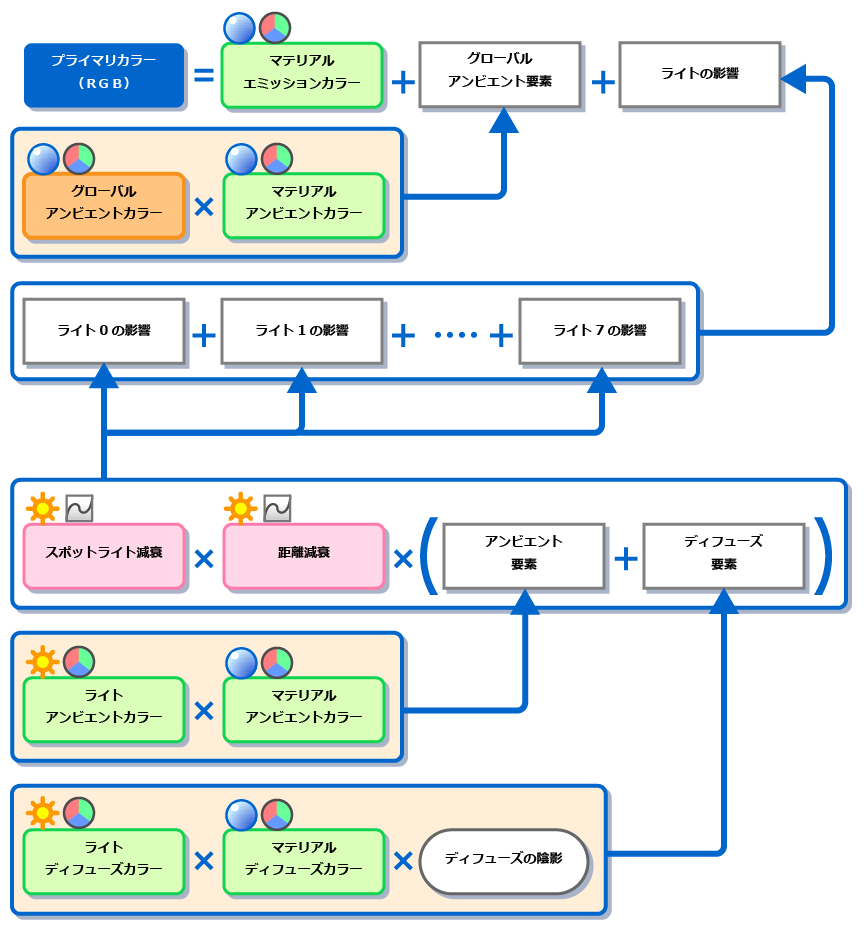
The figure below depicts the flow of the calculation for the primary color. The influence of emissive color and global ambient color are output even if light has not been configured.
Secondary color
The figure below depicts the flow of the calculation for the secondary color. The formula for the secondary color is comprised solely of the influences of the specular of each light.
If light has not been configured, the secondary color is always 0 (black color). The formula for secondary color is shown below.
