When executed, the following is displayed.
Upper screen
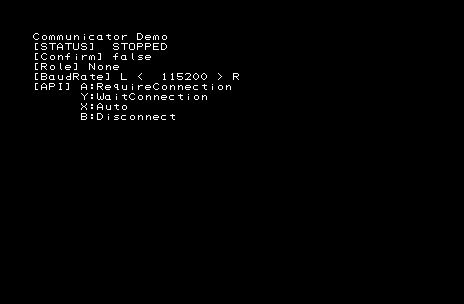
Lower screen

The [STATUS] displays indicate the following states.
| Status | Description |
|---|---|
| STOPPED | This is the initial state. This is the state when communication with the partner is disconnected. |
| TRYING_TO_CONNECT | The connection is being processed. |
| CONNECTED | Connection is complete. |
[Confirm] indicates whether the communication ID confirmation has completed.
[BaudRate] sets the communication baud rate. This operation can be executed only when the STATUS is STOPPED.
The [Role] displays indicate the following states.
| Status | Description |
|---|---|
| None | Indicates no party is connected. |
| Require | Indicates the party who sent connection request is connected. |
| Wait | Indicates the party who waited to receive the connection request is connected. |
Wait side marker (lower screen) can be manipulated by the slide pad on the Require side.