The following screens are displayed when you run the demo. Adjust the stereoscopic image with the 3D slider.
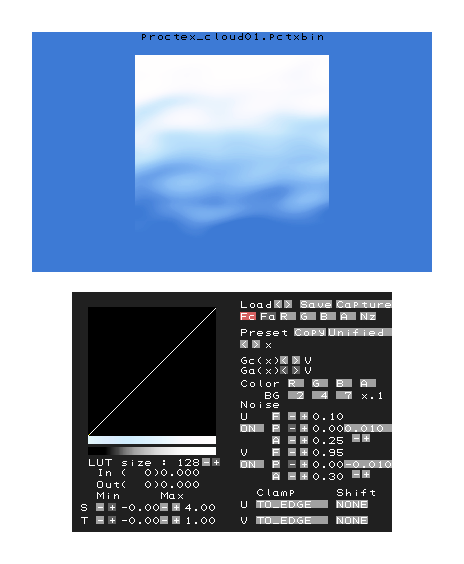
Images can be moved using the Circle Pad in combination with the L and R Buttons.
Each procedural texture setting can be changed using the touch panel.
- LUT size: Lookup table width selection (2, 4, 8, 16, 32, 64, or 128)
- S (Min side): Polygon left edge texture coordinate (to 0.0)
- S (Max side): Polygon right edge texture coordinate (0.0 and up)
- T (Min side): Polygon bottom edge texture coordinate (to 0.0)
- T (Max side): Polygon top edge texture coordinate (0.0 and up)
- Save: Saves parameters
- Load: Loads parameters saved using the Save button
- Capture: Saves captured images to SD Card
- Fc: Change the lookup table being edited to F function (color)
- Fa: Changes the lookup table being edited to F function (alpha) (only in alpha separate mode)
- R: Changes the lookup table being edited to Red Component Table
- G: Changes the lookup table being edited to Green Component Table
- B: Changes the lookup table being edited to Blue Component Table
- A: Changes the lookup table being edited to Alpha Component Table
- Nz: Changes the lookup table being edited to Noise Function
- Preset: Selects the preset function (name displayed on the right) using the < and > controls below, and overwrites the lookup table with Copy
- Unified/Separate: Switches between unified mode and alpha separate mode
- Gc(x): Selects the G function (color)
- Ga(x): Selects the G function (alpha) (alpha separate mode)
- Color: Switches whether to apply lookup tables to each component (R, G, B, and A)
- BG: Changes the background color of the upper screen (from 0.0 to 1.0 in steps of 0.1)
- Noise: Changes the set of noise parameters (same operation for both U and V components)
- ON/OFF: Enables and disables noise
- F, P, A: Enables and disables the noise parameters (F, P, and A) (Parameters are adjusted using the + and - controls)
- Stop/0.XXX: Sets the value to be added each frame when the noise parameter P varies each frame (no change when stop is used)
- Clamp: Switches the texture clamp mode
- Shift: Switches the texture shift mode
The following log is also displayed in debug output.
Initialize Memory
Initialize Memory
    Main   : 0x08800000 - 0x09C00000
    Device : 0x14000000 - 0x16000000
Translate object -X/+X : Slide pad left/right .
Translate object -Y/+Y : Slide pad down/up    .
Translate object -Z/+Z : Slide pad down/up    + L .
Rotate object    -X/+X : Slide pad down/up    + R .
Rotate object    -Y/+Y : Slide pad left/right + R .
Rotate object    -Z/+Z : Slide pad left/right + L .
Scale object     -X/+X : Slide pad left/right + L + R .
Scale object     -Y/+Y : Slide pad down/up    + L + R .
[Status] SD card found.
[Status] Read procedure parameter files from SD card .