The WBC Library is used to convert the raw values obtained using WPADRead from Wii Balance Board accessory (press values) into weight values.
The following include file is required:
$REVOLUTION_SDK_ROOT/include/revolution/wbc.h
The library archive file is $REVOLUTION_SDK_ROOT/RVL/lib/wbc[D].a.
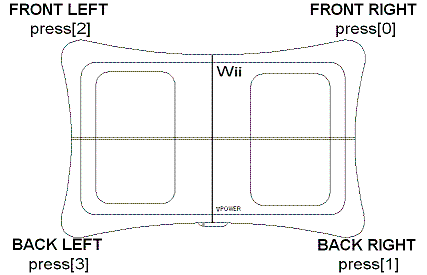
WPADRead corresponds to the Balance Board's legs as shown below.
WPADIsRegisteredBLC to check whether a Wii Balance Board accessory has already been paired. If a paired Wii Balance Board accessory is then paired with a different Wii console, the Wii Balance Board accessory's settings are overwritten and it will need to be normal-paired again.
First, create a conversion formula within the library, which will convert the readings to weights. Each Wii Balance Board accessory stores unique calibration data, and the conversion formula uses that calibration data. By calling WBCSetupCalibration, the calibration data will be loaded and the conversion formula will be created within the library.
Bear in mind that WBCSetupCalibration may be executed only after the Wii Balance Board accessory is paired.For details, see the sample demo (handling_weight.c).
After this function is executed, you may use the WBCRead, WBCSetZEROPoint, and WBCGetTGCWeight functions.
(The WBCGetBatteryLevel function can be used without executing WBCSetupCalibration beforehand, but it is the only exception.)
Control will return immediately after executing this function, but its actual processing continues for a short time (about 650ms) before completing. Use WBCGetCalibrationStatus to determine whether this function has completed normally.
Setting the zero point is the act of setting the Wii Balance Board accessory's unloaded state in the WBC Library. The zero point must be set every time before measuring a weight. (Refer to 6. Balance Sensors for more on the importance of always setting the zero point.)
s32 WBCSetZEROPoint(double press_ave[], u32 size);
For the press_ave argument, set the average value of all the press values obtained by WPADRead over a period of two seconds. Set press_ave in the same order as the press values. (For example, the average of status.press[1] should be inserted into press_ave[1].) In size, specify the the number of elements in the press_ave array. (Normally, allocate space for four elements.)
Before sampling for each press value, use the temperature update command (WPADControlBLC) to update the Wii Balance Board accessory's temperature information.
After updating the temperature with the temperature update command (WPADControlBLC), use WPADRead to confirm that temperature was correctly updated.On very rare occasions a value of -128 or 127 is returned for temperature. If that happens, execute the temperature update command again.
On very rare occasions, the Wii Balance Board press values can fluctuate wildly for a short period after a command is sent.Therefore, after issuing the temperature update command, wait a short time (roughly 200ms) before getting the press values.
The readings are converted into weight values with the following function.
s32 WBCRead(WPADBLStatus *status, double weight[], u32 size);
Specify the WPADBLStatus structure, obtained with WPADRead, as an argument. The converted weight values will be stored in weight array in the same order as the array of press values. In size, specify the the number of elements in the weight array. (Normally, allocate space for four elements.)
double WBCGetTGCWeight(double total_weight_ave, WPADBLStatus *status);
In the total_weight_ave argument, specify the average value obtained over a period of two seconds (120 samples) for the total of the weight values obtained by WBCRead at four different points. You must always execute correction before using the weight values. For more about the importance of correcting for temperature and gravitational acceleration, refer to 6. Balance Sensors.
The balance sensors on each of the Wii Balance Board accessory's four corners will cease to operate when their remaining battery life drops below a certain threshold. However, the wireless module will continue to operate even below the threshold, causing data to continue to be sent from the Wii Balance Board accessory. All values of press will become zero at this time.
When the remaining battery life is below the threshold, the WBCGetBatteryLevel function will return zero. The application uses this function to check the remaining battery life; if zero is returned, prompt the user to replace the battery.
Balance sensors have the characteristic of not completely returning to their original state after a weight is applied and then subsequently reduced; that is, they exhibit hysteresis. For example, assume that the zero point has been set. A person (or object) gets onto and then off of the Wii Balance Board accessory. Now, the state of the Wii Balance Board accessory is not exactly the same as its state when the zero point was set.
In this way, the unloaded state of the balance sensors changes every time a person (or object) gets onto and off of the Board. For this reason, you must always set the zero point before making an accurate measurement.
The balance sensors are metallic (aluminum). The malleability of a metal changes with the temperature. Specifically, they are more malleable (easier to bend) at high temperatures and more stiff (difficult to bend) at low temperatures. More malleable balance sensors will yield heavier weight values, while more stiff ones will yield lighter weight values.
"Weight" changes in proportion to gravity. As a result, weight values must take gravitational acceleration into account. Gravitational acceleration differs slightly with latitude. Specifically, the earth's rotation applies the greatest centrifugal force to a latitude of zero (right on the equator), causing a smaller gravitational acceleration there. The end result is that weight values at the equator will be lighter, and weight values at the north and south poles will be heavier.
The WBCGetTGCWeight function corrects for both temperature and gravitational acceleration. Always use the WBCGetTGCWeight function to correct weight values when making accurate measurements.
The following steps summarize the ideal process for making accurate measurements:
1. Have the player step off of the Wii Balance Board accessory.
2. Set the zero point when there is no load.
3. Immediately have the player step onto the Wii Balance Board accessory and measure the player's weight.
4. Correct the measured weight value using the correction function.
2008/02/22 Supplemented the description of the two-second average with information about 120 samples.
2007/12/06 Added a warning related to disconnecting a P4 link. Added a cautionary note on setting the zero point.
2007/11/15 Changed internal processing of the Wii Balance Board accessory's pairing information. Revised the text to reflect this. Added text regarding Sensors and Battery Lifetime.
2007/10/02 Changed the name of WBCInit to WBCSetupCalibration. Revised the text to reflect this.
2007/09/28 Corrected typos.
2007/09/26 Added more to the Wii Balance Board accessory description. Added the caution about obtaining the temperature.
2007/09/10 Added to the Wii Balance Board accessory description. Revised text in line with changes to the function format.
2007/08/31 Initial version.
RVL-06-0287-001-C
CONFIDENTIAL