GXInitLightSpot
Syntax
#include <revolution/gx.h>

void GXInitLightSpot(
    GXLightObj* lt_obj,
    f32         cutoff,
    GXSpotFn    spot_func );
Arguments
| lt_obj |
Pointer to a light object. |
| cutoff |
Spotlight cutoff angle (in degrees).0 < cutoff <= 90. |
| spot_func |
Types of light volume distribution functions. Accepted values are:
| Name |
Spot (Angular Attenuation) Function Types |
| GX_SP_OFF |
No attenuation. |
| GX_SP_FLAT |
See the figures below. |
| GX_SP_COS |
| GX_SP_COS2 |
| GX_SP_SHARP |
| GX_SP_RING1 |
| GX_SP_RING2 |
|
Return Values
None.
Description
This function sets coefficients for angular (spotlight) attenuation in light objects. This can be also set with the GXInitLightAttn function. This function uses two easy-to-control parameters instead of a0, a1, and a2, which are used by the GXInitLightAttn function.
The cutoff argument specifies the spotlight's cutoff angle in degrees. The spotlight works when the angle between the ray for a vertex and the light direction given by the GXInitLightDir function is smaller than this cutoff angle. The value used for cutoff should be 0 < cutoff <= 90.0. Otherwise, the given light object doesn't become a spotlight. (Some spotlight types require tighter range.)
The spot_func argument defines the type of the illumination distribution to be used within the cutoff angle. The following graphs show the curves of the distribution functions given by acceptable values for spot_func. The value GX_SP_OFF turns the spotlight feature off even if the color channel setting uses GX_AF_SPOT (see the GXSetChanCtrl function).
| Graph |
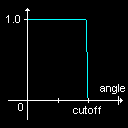 |
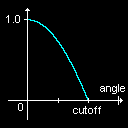 |
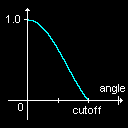 |
| Type |
GX_SP_FLAT |
GX_SP_COS |
GX_SP_COS2 |
| Valid Range |
0 < cutoff <= 90 |
0 < cutoff <= 90 |
0 < cutoff <= 90 |
| Graph |
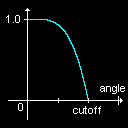 |
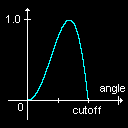 |
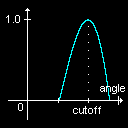 |
| Type |
GX_SP_SHARP |
GX_SP_RING1 |
GX_SP_RING2 |
| Valid Range |
30 < cutoff <= 90 |
30 < cutoff <= 90 |
30 < cutoff <= 90 |
This function can generate only some kinds of simple spotlights. For more flexible control, use the GXInitLightAttn function and calculate the appropriate coefficients.
This function sets parameters only for angular attenuation. Parameters for distance attenuation may be set using the GXInitLightDistAttn or GXInitLightAttnK function.
This function does not load any hardware registers directly. To load a light object into a hardware light, use the GXLoadLightObjImm or GXLoadLightObjIndx function.
See Also
GXInitLightAttn,
GXInitLightAttnA,
GXInitLightAttnK,
GXInitLightDistAttn,
GXLightObj Initialization Flow
Revision History
2006/03/01 Initial version.
CONFIDENTIAL