Operating System Log (OSLog) Overview List
Introduction
OSLog is an extended API that allows OSReport output results to be written to Wii console NAND memory.
Developers can choose the output destination from three options: serial output, Wii console NAND memory, and both serial output and Wii console NAND memory at the same time.
The OSReportDestination function is effective in cases such as when debugging on hardware that cannot use serial output.
The following features have been built into the supplied OSReportViewer.
- View logs written to Wii console NAND memory
- Copy written log to SD Card
- Delete written log
Note: OSLog features can be used by including revolution/os/OSLog.h and linking oslog.a.
OSReportViewer must be imported and started to allocate the memory used by OSReport to write to Wii console NAND memory.
OSLog Library Process Model
(1) Memory Allocation
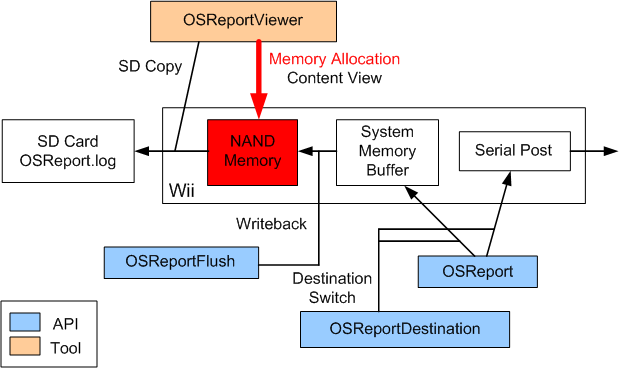
Before starting a program to debug, import OSReportViewer and start it.
This allocates the memory required by OSReport to write to Wii console NAND memory.
First, go to (REVOLUTION_SDK_ROOT)/RVL/bin/tools.
Once Nmenu is started using ndrun, an Import List is displayed. The file OSReportViewer.wad is included in this list and can be imported to Wii console NAND memory.
If you cannot find OSReportViewer.wad using Nmenu, it may be that the DvdRoot setting is incorrect or that OSReportViewer.wad is not included in DvdRoot/viewer.
If import is successful, press the B Button to move to the Title List.
If import has been successful, 0x024f5256 appears in the Title List.
To launch OSReportViewer, press the A Button.
If the display goes to a blue screen, a blank page without any errors, it indicates that memory has been allocated successfully.
(2) Write Procedure

Next, start the program to be debugged and execute actual OSReport output.
You can switch the output destination by setting one of the three argument options for the OSReportDestination function: OS_REPORT_NAND, OS_REPORT_SERIAL, or both OS_REPORT_NAND and OS_REPORT_SERIAL at the same time.
(3) Write Back Procedure
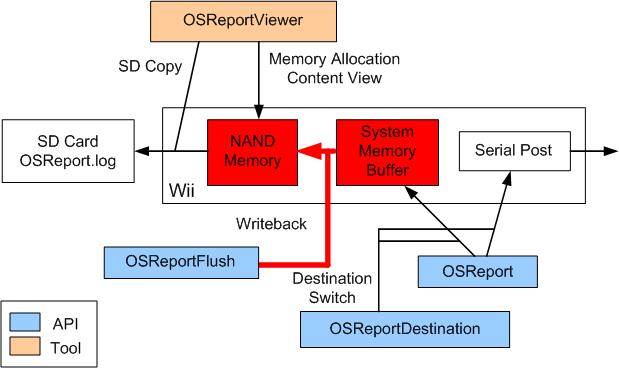
If OSReport is called while the output destination for OSReport is set to Wii console NAND memory, the string is temporarily stored in a buffer in main memory of the Wii console without writing it directly to Wii console NAND memory.
OSReportFlush must be called to write this string correctly to Wii console NAND memory.
Strings in main memory at time of flushing are added to the end of the file used by OSReport to write to Wii console NAND memory.
Developers should perform this task at a time convenient for them.
(4) View Procedure

Written logs can be checked by viewing them with OSReportviewer.
OSReportViewer can check logs as a NAND application and can delete logs when they have accumulated.
A feature for copying written logs to an SD Card is also available.
Revision History
2008/11/19 Initial version.
CONFIDENTIAL