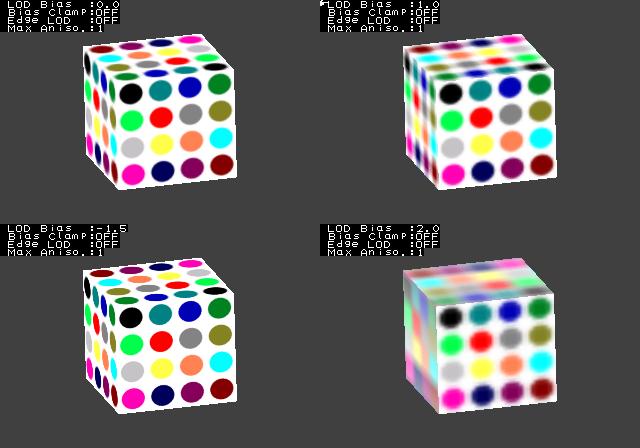
This program tests advanced LOD control mode of mipmapped texture such as LOD bias, edge-diagonal-LOD mode, bias clamping, and anisotropic filter. The screen is divided into four sections and it is possible to compare differences by setting parameters for the texture of each section.
| Function | Parameters | Description |
GXInitTexObj |
Pointer to image data. | Appropriate value. |
| Width and height | only power of 2 (depends on tpl file) | |
| Format | some formats (depends on tpl file) | |
| Wrap mode (s, t). | one or more (depends on tpl file) | |
| Mipmap | Always GX_TRUE. | |
GXInitTexObjLOD |
minification filter | Always GX_LIN_MIP_LIN. |
| Magnification filter | Always GX_NEAR, GX_LINEAR. |
|
| Minimum LOD | Always 0 (depends on tpl file). | |
| Max LOD | Existing values (depends on tpl file). | |
| LOD bias | Various values. | |
| Bias clamp | GX_TRUE / GX_FALSE | |
| Edge LOD enable | GX_TRUE / GX_FALSE | |
| Anisotropic filter | GX_ANISO_1, GX_ANISO_2, GX_ANISO_4 |
|
GXLoadTexObj |
Destination texture name. | Always GX_TEXMAP0. |
GXSetTevOp |
TEV stage ID | Always GX_TEVSTAGE0. |
| Operation mode | Always GX_REPLACE. |
START exits the demo.
The Control Stick rotates the cube in the selected screen section.
The C Stick changes the scale of the cube in the selected screen section.
X and Y Buttons move the cursor and select a section and a parameter to change.
L and R Buttons change the value of the selected parameter.
The B Button synchronizes the rotation and scale settings of all cubes.
The A Button changes the texture for all cubes.
Various LOD bias settings.
Edge-LOD / Anisotropic filter.

Bias clamp.

$REVOLUTION_SDK_ROOT/dvddata/gxTests/tex-01.tpl
03/01/2006 Initial version.