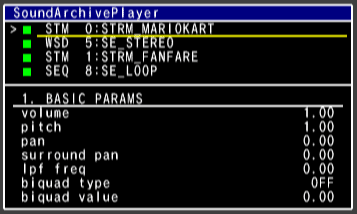
SoundPlayer displays various sound-related information on a TV screen.
A simple window system is used on the screen; the window where the cursor appears is the active window.
This section explains the roles of the various windows on the screen and the meaning of what is displayed.
This is the main window, where you start and stop the playback of sounds.
The SoundArchivePlayer window is divided into an upper and lower region.
The upper region is called the play pane, and the lower one is called the parameter pane.
The following information is displayed in order on each line of the play pane:
Sound Type: WSD, STM, and SEQ correspond to wave sounds, stream sounds, and sequence sounds, respectively.
Sound Number: The number of the selected sound.
Sound Name: The name of the selected sound.
In the parameter pane, the parameter type is displayed on the topmost line, while the values of each parameter are displayed on the next line.
The parameters have been divided into the following five types.
1. BASIC PARAMS
2. PLAY OPTION
3. OUT SWITCH
4. OUT VOLUME
5. SEND PARAMS
Displays the status of the synthesizer and AX, such as current playback mode, the processing load on the DSP, and the communication status with the Wii Remote speaker. Used to confirm the sound's DSP load and other information and to switch playback modes.
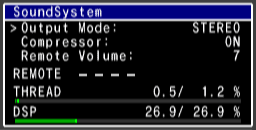
Output Mode: Indicates the current sound playback mode.
MONAURAL: Monaural playback mode.
STEREO: Stereo playback mode. This is the default playback mode.
SURROUND: Dolby Surround (matrix) playback mode.
DPL2: Pro Logic II (Dolby Pro Logic II) playback mode.
Compressor: Displays the current compressor status.
Remote Volume: Indicates the volume of the Wii Remote.
It is possible to change hardware volume of the Wii Remote from the Wii System Settings menu.
The new hardware volume can be written to the system's internal flash memory.
REMOTE indicates with an icon the communication status with the Wii Remote.
The display corresponds to Wii Remote numbers 0 to 3, from the left.
-: Wii Remote speakers cannot be used
■: Wii Remote speakers can be used, but no data is being sent
Play mark: Data is being sent
THREAD indicates the processing load of the current sound thread.
DSP indicates the current processing load on the DSP.
This window shows the voice actually being output by the AX in real time and its level. Use this window to check, for example, how many voices the sequence sound is consuming.
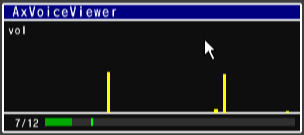
xx/xx at the bottom of the window / ?? are numbers. Those to the left of the slash indicate the currently active number of physical voices. Whenever this number reaches a new high, it is displayed for a few seconds on the right.
Displays the master-out status in waveform format in real time.
Use this window to identify the cause of clipped noise and so on.
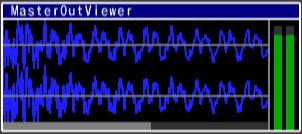
Shows the waveform for the most recently played 8,192 samples (0.256 seconds).
You zoom and scroll inside this range.
The extent of horizontal zooming is shown in the scroll bar at the bottom of the window.
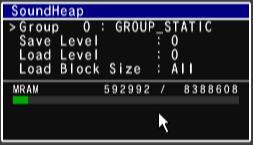
Displays the state of the sound heap.
Use this window to try loading and destroying data in the sound heap.
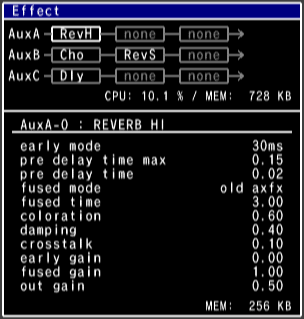
The type of effect to be applied to the auxiliary bus and parameters for each effect can be changed.
As many as three effects can be registered to one bus and played in series.
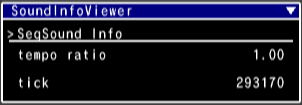
Displays the state of sound. Switch pages to change the sound type.
-Sequence Sound Page One
Tempo can be adjusted to various values at even intervals.
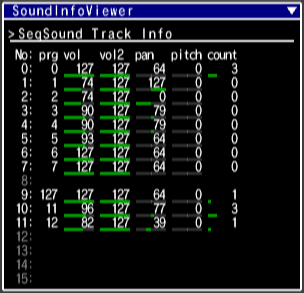
-Sequence Sound Page Two
For sequence sounds, the various parameters for 16 channels are shown in real time.
The count column indicates the number of voices playing on that channel.
-Stream Sound Page One
(No usable items exist here.)
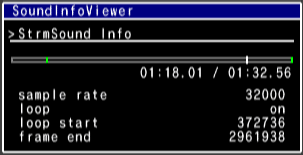
-Stream Sound Page Two
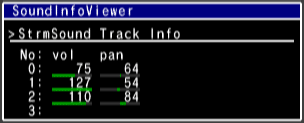
-Wave Sounds
(No usable items exist here.)
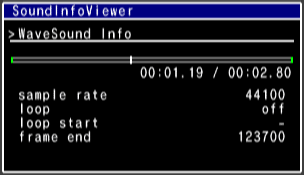
Displays the Player's status and parameters. The parameters can also be changed in this window.
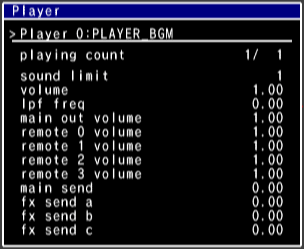
playing count shows the number of sounds currently being played and the most sounds played simultaneously since the monitoring began.
sound limit shows the sound limit of the Player being monitored.
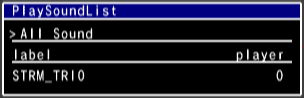
Displays the list of sounds currently playing. You can switch between the display of all sounds, sounds by type, or sounds by Player.
When sounds by Player are displayed in this window, they are shown in the order of priority. For other displays, sounds are shown in Player order.
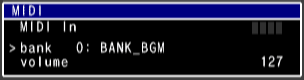
Using the selected bank, plays back input signals through a MIDI adapter.
The input indicators are contained in the "MIDI In" row. Controller inputs 1, 2, 3, and 4 are numbered from the left.
For a detailed description of the MIDI adapter, see "Using the MIDI Adapter".
This window is used to manipulate and check the state of sequence variables.
It has the following features.
- Displays the status of the current sequence variable
- Writes arbitrary values to the sequence variables
- Plays and stops the sounds that are selected in the SoundArchivePlayer window
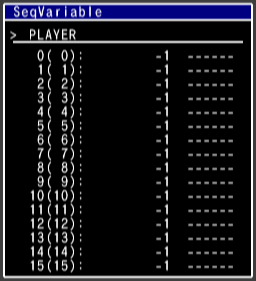
First row is the title row, and it is separated into player variables, global variables, and track variables.
The first "0(0)" is the sequence variable number. Consecutive variable numbers are shown inside the parentheses; global variables start with 16, and track variables start with 32.
The number in the second column is the edit value. Merely changing the numerical value has no effect on the actual variable; to apply the change, a write operation must be performed.
The value in the third column is the value of the current sequence variable.
When playback of the sequence sounds begins, the edit value will be automatically written to the marked variable.
This window allows you to check warning messages and other information provided by OSReport.
The same string as serially output to the computer can be confirmed on the TV screen.
CONFIDENTIAL