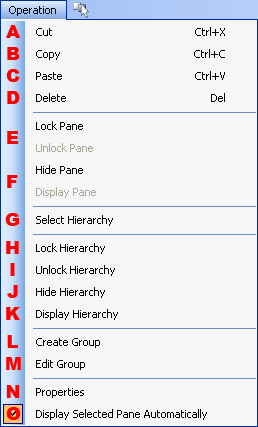
Cuts the selected pane.
Copies the selected pane.
Pastes into the selected pane.
Deletes the selected pane.
Locks or unlocks the selected pane.
Shows or hides the selected pane.
Selects all selected panes and associated children.
Locks selected panes and associated children.
Unlocks selected panes and associated children.
Hides selected panes and associated children.
Displays hidden panes for selected panes and associated children.
Creates a group from selected panes.
There is no change in the Hierarchy window, so verify this in the Group window.
Edits the group information of the selected panes.
Displays the Pane Group Edit dialog.
(Can be specified if one or more groups exist in the layout.)
Displays the selected pane's properties.
Sets whether the selected pane is displayed automatically.
If this item is enabled, the corresponding node is automatically displayed when the pane is selected in the layout window or elsewhere.
CONFIDENTIAL