Model Culling Properties
Performs model view frustum culling-specific settings.
Culling settings are saved in the model file (rmdl) and can be used as-is by the 3D library.
Note that the layout used for the preview and action list settings are handled differently.
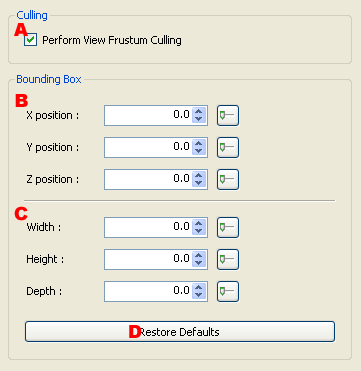
-
Specifies whether view frustum culling should be used.
A bounding box is displayed in the Viewer when performing view frustum culling.
-
Sets the center position of the bounding box.
The settings are configured in the Slider Window.
-
Sets the size (width, height, depth) of the bounding box.
The settings are configured in the Slider Window.
-
Restores the settings of the bounding box to initial values.
The bounding box is displayed only when a target model has been selected for 3DEditor.
CONFIDENTIAL