Properties
The properties of the selected object are displayed in the Property Window.
This window is used for editing the properties.
The information displayed in the Property Window will vary, depending on the kind of object that has been selected.
Property Window
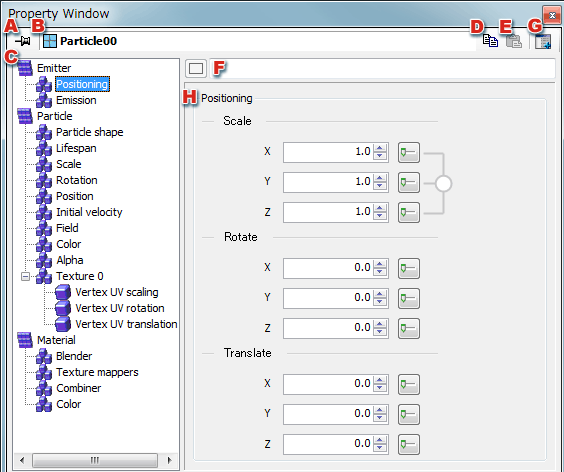
-
Fixes the target object.
When the target object is fixed, the target object does not change even if the selected object changes.
-
Displays the name of the object that is the property setting target.
When multiple objects are selected, the names of objects in focus and the number of selected objects of the same type are displayed.
-
Displays property items of the target object.
When a property item is selected, the details of the selected item are displayed on the right side of the dialog box.
The composition of the property items will depend on the target object's type.
-
Copies the settings of the selected property item.
If the property item has child items, all settings are copied, including the child items.
Select the root directory to copy all settings of the object.
-
Pastes the copied properties.
To paste, same items as the copied property items must be selected.
-
Sets the task comment for the target object.
The same text appears here as displayed for comments in the Project Window.
The task comments are saved in the project file, but are not reflected in the binary resource.
Use the comment field to make explanatory remarks about objects when working with 3DEditor.
-
Displays property windows having the same target object in another window.
There are no restrictions on the number of windows that can be displayed.
Using this feature, the following operations are possible.
- Displaying properties for several objects at once.
- Displaying different property items of the same object at once.
-
Displays details of the selected property item.
Properties are edited in this view.
CONFIDENTIAL