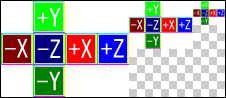
Cubemaps are created under Photoshop as shown below by arranging images for each view direction in a horizontal cross pattern without gaps between images.
| +Y | |||
| -X | -Z | +X | +Z |
| -Y |
(The white parts in each of the four corners are not used.)
Images for each view direction must be squares (with same width and height) having a size that is a power of two equal to or greater than 8 and equal to or less than 1024.
The coordinate axes of each view direction image under Photoshop are defined as follows.
| View Direction | Up | Right |
|---|---|---|
| +X | +Y | +Z |
| -X | +Y | -Z |
| +Y | +Z | +X |
| -Y | -Z | +X |
| +Z | +Y | -X |
| -Z | +Y | +X |
Because the direction going up is -Y under CTR, data rotated 180 degrees is output in TGA file additional information and ctex files for images representing the +X, -X, +Z, and -Z view directions.
For images arranged in a horizontal cross, a mipmap image for the cubemap can be created by executing the mipmap creation plug-in.
CONFIDENTIAL