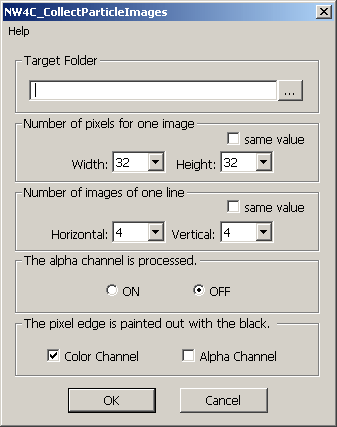
This plug-in collects the serial numbered images in the folder specified under Photoshop into a single image.
A dialog box will appear if you execute [Automatic Processing] -> [NW4C_CollectParticleImages] on the [File] menu. Make all necessary settings and click OK to start collection and create a file of collected images.
Target Folder gives the folder name where particle images are located as a full path.
The target folder can also be selected in the folder seelction dialog by clicking the [...] button.
Number of pixels for one image is used to select the size of a single image (unit: pixels).
Select both the width and height from the list.
Selectable values are 8, 16, 32, 64, and 128, respectively.
Selecting the [same value] checkbox disables the Height list and selects the same value as selected for Width.
Number of images of one line is used to select the number of images to be located on a single line.
Select both the Horizontal and Vertical from the list.
Selectable values are 1, 2, 4, 8, and 16, respectively.
Selecting the [same value] checkbox disables the Vertical list and selects the same value as selected for Horizontal.
The alpha channel is processed is used to switch alpha channel processing ON/OFF.
The pixel edge is painted out with the black is used to switch the fill in black for the edge pixel between each collected image ON/OFF.
Each edge pixel is filled with black if [Color Channel] is selected.
Each edge pixel of the alpha channel is filled with black if [Alpha Channel] is selected.
[Alpha Channel] only works if [The alpha channel is processed] is ON.
Layers are automatically combined if there is more than one visible layer in the loaded image.
If alpha processing is being used and the loaded image includes a background layer, the image is used by combining all visible layers other than the background layer.
Use [Bilinear] for the interpolation method when enlarging or recuding an image.
CONFIDENTIAL