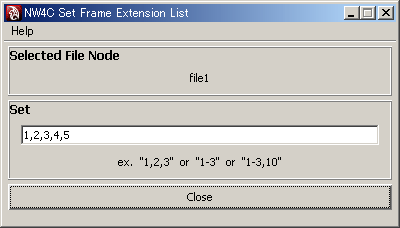
When the texture pattern animation is set, the only textures output by default are those specified by the Image Name attributes of the file node, and those whose corresponding key value has been set for the Frame Extension attribute. Use of this plug-in allows textures corresponding to any particular Frame Extension to be forcibly output.
If expressions or animation layers are connected to the Frame Extension, you must use this plug-in to configure the texture list that is displayed.
From the NW4C menu, run NW4C Set Frame Extension List to display the window.
Selected file nodes are displayed in the Selected File Node field.
Setting Attributes
Selecting just one file node (or material node) will display the current setting for that node in the Set field.
Enter a list of the texture numbers (Frame Extensions) for output to the Intermediate file, and press the Enter key to confirm. An error will result at this time if the Use Image Sequence (the Use Frame Extension attribute) of the file node is OFF.
Use the following list format
1,2,3
to specify the texture numbers to be output, each delimited with a comma (,). In this example, assume that the Image Name of the file node is "name.1.tga", and the textures
"name.1.tga"
"name.2.tga"
"name.3.tga"
are forcibly output, even without a key being set for the Frame Extension attribute. A warning will be displayed at time of output if textures corresponding to the numbers specified do not exist. Furthermore, negative numbers cannot be specified.
If numbers are continuous, rather than writing
1,2,3,4,5
you can specify the same range as follows:
1-5
using a hyphen (-) to connect the numbers.
A specification like the following:
3-6,10
is equivalent to writing 3,4,5,6,10.
It is also possible to delimit texture numbers using an ASCII space rather than a comma.
The following formatting mistakes will result in an error.
1-3-5 (two hyphens are connected to the same number)
-3    (starts with a hyphen)
5-     (ends with a hyphen)
Writing "01,02" has the same effect as writing "1,2". If files having the names "name.1.tga" and "name.01.tga" both exist, the texture without a 0 attached will always be output.
A different node can be set by selecting it without closing the window.
CONFIDENTIAL