General
You can configures general camera settings here.
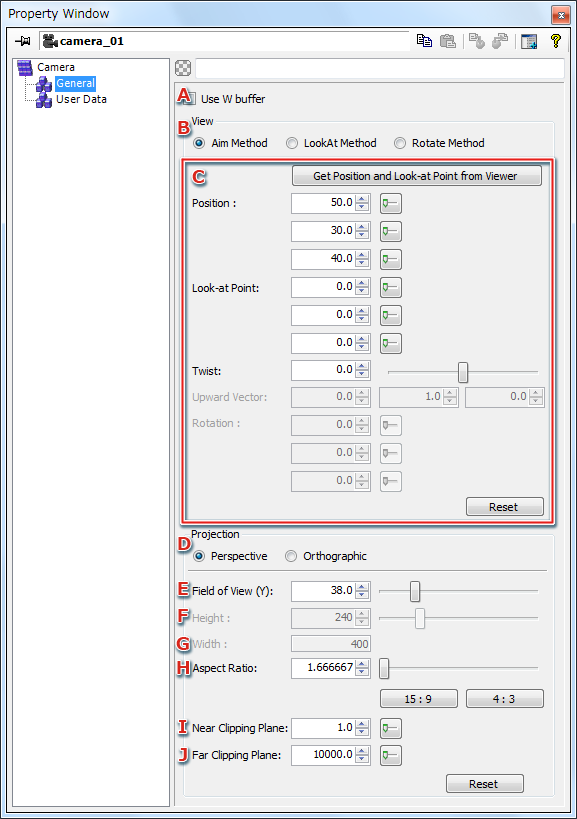
- Use W buffer
Select this item when using the W buffer with the camera.
- Configures the camera type. Information shown under C differs depending on the camera type.
- Aim method
- This type controls the camera's orientation based on position, viewpoint and twist.
Further details are given in Aim Type Settings.
- LookAt method
- This method controls the camera's orientation based on a vector that controls the y-axis tilt, the look-at position, and the viewpoint position.
Further details are given in LookAt Type Settings.
- Rotate
- This method controls the camera's orientation based on position and rotation angle.
Further details are given in Rotate Type Settings.
- Content will vary dependent on the camera type set in A.
- Configures the camera projection method.
- Persp
- Configures as a perspective projection camera.
- Ortho
- Configures as a orthographic projection camera.
- Configures the view angle in the Y direction for perspective projection.
This is enabled only when the projection method is set to Persp.
The settings are configured in the Slider Window.
- Sets the height of the visible capacity for orthographic projection.
This is enabled only when the projection method is set to Ortho. The settings are configured in the Slider Window.
- Displays the width of the visible capacity for orthographic projection. It is derived from the
Height and Aspect values.
This value therefore cannot be set directly.
- The aspect ratio.
The settings are configured in the Slider Window.
- Sets the distance to the camera's near clipping plane.
The settings are configured in the Slider Window.
- Sets the distance to the camera's far clipping plane.
The settings are configured in the Slider Window.
Aim Type Settings

- Get the position and viewpoint from Viewer
Gets the camera position and viewpoint from the Viewer.
Only enabled when connected to the Viewer.
- Sets the camera position.
- Sets the camera viewpoint.
- Sets the rotation angle with respect to the camera's view direction (positive values indicate a counterclockwise direction). In units of degrees.
The settings are configured in the Slider Window.
The position and viewpoint values used in the Viewer are not always reflected, even when communicating with the Viewer. To reflect the values used in the Viewer, they must be gotten explicitly by using the A button.
LookAt Type Settings

- Get the position and viewpoint from Viewer
Gets the camera position and viewpoint from the Viewer.
Only enabled when connected to the Viewer.
- Sets the camera position.
- Sets the camera viewpoint.
- Sets the camera's up vector.
The position and up vector values used in the Viewer are not always reflected, even when communicating with the Viewer.
To reflect the values used in the Viewer, they must be gotten explicitly by using the A button.
Rotate Type Settings

- Get the position and viewpoint from Viewer
Gets the camera position and viewpoint from the Viewer.
Only enabled when connected to the Viewer.
- Sets the camera position.
- Configures the camera rotation angle. In units of degrees.
The position and rotation angle values used in the Viewer are not always reflected , even when communicating with the Viewer.
To reflect the values used in the Viewer, they must be gotten explicitly by using the A button.
CONFIDENTIAL