Merging Model Files
This section explains the process of merging Model files.
Overview of the Merge Process
Model file merging is a feature that takes the node and material settings of a Model file edited and saved with 3DEditor and applies those settings to a Model file that has been exported from the 3DCG tool.
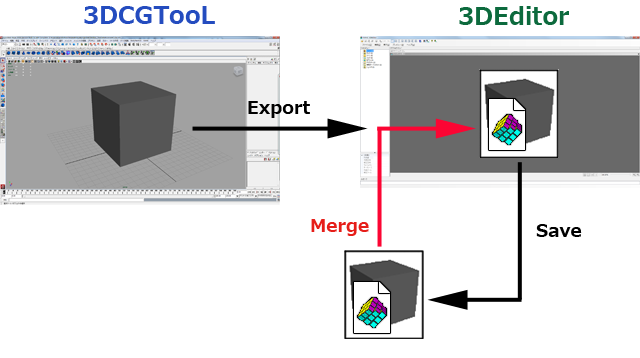
Merging
This section describes how merging is used.
Normal method of use
You can configure the Export plug-in of the 3D CG tool to predefine which Model file will be merged when the model data is sent to 3DEditor.
By doing this, the specified Model file will be automatically merged when the model data are output from the 3D CG tool and sent to 3DEditor.
The flow for this task is as follows:
- Send model data from the 3D CG tool to 3DEditor.
- Edit the material settings and other settings using 3DEditor and save the Model file.
- Set the Model file saved in step 2 as the model file for merging when data are sent again from the 3D CG tool.
In this merge process, the default operation is the merging of nodes and materials that have the same names.
Content altered by the merge process
Merging results in changes to the following content in the Model file exported from the 3DCG tool:
- The model's culling settings.
- The settings of the nodes that are targets of the merge (the property settings and the 3DEditor task information).
- The settings of the materials that are targets of the merge (the property settings and the 3DEditor task information).
Content not altered by the merge process
The following content does not get changed in the Model file exported from the 3DCG tool:
- The node structure in the model.
- The material structure in the model.
- The model's polygon shapes and their vertex data.
Textures referenced from models
When Model files are merged, the textures are processed as follows:
- If the target model and the model that is being merged into the target both reference a texture with the same name, the texture referenced by the target model takes priority.
- Any texture that is referenced only by the model being merged into the target gets added during the merge process.
Uses of Merging
With NintendoWare, the creation and adjustment of 3D model data is done using both the 3DCG tool and 3DEditor. The flow of this procedure is as follows:
- Using the Export plug-in, send to 3DEditor the model data that was created with the 3DCG tool.
- While previewing, use 3DEditor and the Viewer to configure the hardware-specific (the CTR-specific) material rendering settings and other settings.
- Using 3DEditor, save the configured model data in the format of a 3D intermediate file.
Steps 1 and 2 of the above procedure can be repeated.
By using this Model file merge feature, the node and material settings configured in step 2 can be applied to model data re-exported from the 3DCG tool.
CONFIDENTIAL