Creation of a sequence sounds requires a set of tones (programs) referenced by the sequence as its material. These sets of tones are called "banks."
Banks are created as bank files (extension .cbnk) using a special SoundMaker format and referenced from a sound set.
More than one instrument can be created for the bank. A program number from 0 to 127, corresponding to a MIDI program change, can be configured for these instruments.
Sequence sounds are always created in parallel with bank editing.
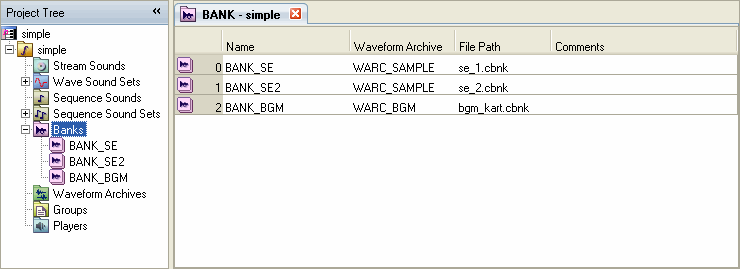
New banks are created using the Bank list in the Sound Set tab.
Select the Bank node in the project tree. The list displayed in the Sound Set tab is the Bank list.
To create a new bank, while the Bank list is showing, select Project → Add Item → Bank....
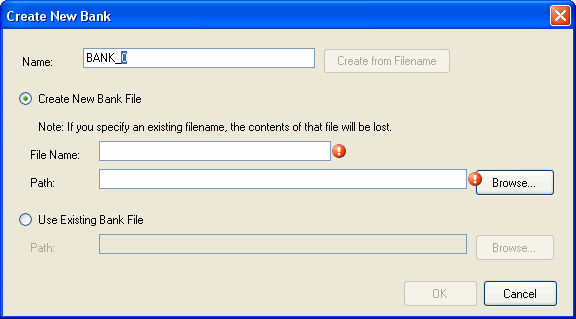
Make the necessary entries in the Create New Bank dialog box that appears.
If you specify a file in the path, the Create from Filename button becomes active.
Bank files are edited in the Bank tab. Open the Bank tab by double-clicking the Bank list on the index cell containing the icon for the bank you want to edit, or by double-clicking the Bank file in the project tree.
The Bank tab is divided into an upper and lower sections. The upper section is called the Instrument List. This list does things like create instruments and specify program numbers.
The lower part of the Bank tab has two further tabs for switching between the display of the Sample Map and the Percussion List. Both the Sample Map and Percussion List can be used to edit instrument regions.
Bank tab operations are explained in detail in the Practical Guide.
CONFIDENTIAL