Select the Waveform Archive node in the project tree to display the waveform archive list in the Sound Set tab.
The displayed list is called the waveform archive list.
Waveform archives group multiple waveform data files that are associated with banks or wave sound sets into a single entity.
Multiple banks and multiple wave sound sets can be associated with a single waveform archive.
In order to create new waveform archives, first double-click the Waveform Archive node in project tree to display the waveform archive list in the Waveform Archive tab. Then right-click within the list and select either the Add Item or Insert Item options from the shortcut menu.
Doing so will display the Create New Waveform Archive dialog box. Enter the name of your waveform archive and specify whether it should be loaded individually.
It is also possible to delete waveform archives by right-clicking an archive and choosing Delete from the shortcut menu. If the waveform archive you've selected for deletion is already being referenced by banks or wave sound sets, a confirmation dialog box will appear asking whether you're sure you want to delete it.
The act of deleting a waveform archive only deletes the links to files referenced by sound sets; it will not delete the actual files being referenced.
This section describes the meaning of each of the elements that define a waveform archive list.
Specifies the file name for the waveform archive.
There are restrictions on the characters that can be used in a name. The following characters can be used.
- The first character must be a single-byte letter or an underscore. [a-zA-Z_]
- Other characters must be single-byte alphanumeric or an underscore. [a-zA-Z0-9_]
When this check box is selected, loading the waveform archive will only load the required waveform data within that waveform archive individually. In other words, selecting this option will mean that the entire waveform archive will not necessarily be loaded.
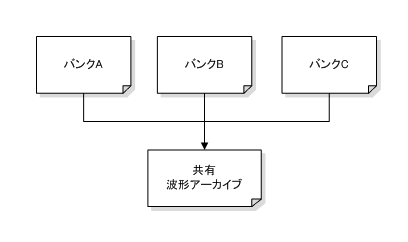
This option works well when a single waveform archive is shared over multiple banks, as in the following.
Waveform data used only in Bank A may be included in the shared waveform archive. When using Bank B, if you load waveform data for Bank A that Bank B does not use, the memory efficiency will decrease.
If the "Load Individually" option were enabled for this shared waveform archive, only the waveform data used by Bank B would be loaded when using Bank B. Any waveform data not used by Bank B that is contained within the shared waveform archive would not be loaded.
Selecting the "Load Individually" option can introduce some overhead in terms of memory usage and load time relative to what would be required if all waveform data in the archive were loaded at once.
In most cases, the overhead issue can be ignored because unnecessary data sets are not loaded, which reduces memory consumption and shortens data set loading time. However, the overhead will increase if there is little or no unnecessary data.
CONFIDENTIAL