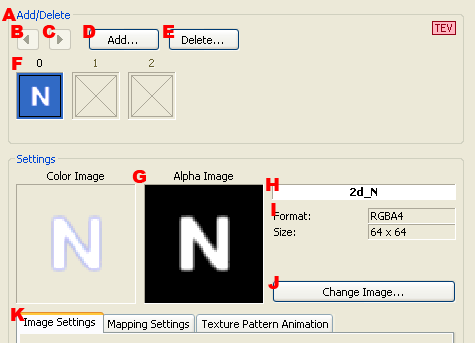
Used to edit details about the textures displayed in a pane.
Divided into two parts: the upper part for managing textures and the lower part for making settings.
Sets the textures to be used by a material.
Texture settings are subject to automatic calculations by the texture combiner (TEV). A mark like that show below displays in the upper right when settings are subject to the texture combiner's automatic calculations.

The number of textures used and the number of TEV stages are shown in the lower left part of the page. The button for turning automatic TEV automatic calculations on/off is also located here.
|
When automatic calculations by texture combiner are OFF 
|
When automatic calculations by texture combiner are ON 
|
The texture's position is changed by moving the selected texture to the left.
The texture's position is changed by moving the selected texture to the right.
The texture is added to the texture having the next number after the selected one.
The dialog shown when the button is pressed is described in The Adding Textures Dialog below.
Deletes the selected texture.
Displays a list of textures used.
Displays a thumbnail image of the texture.
Displays the texture name.
Displays the format and size of the texture.
Changes the texture's image.
The dialog displayed when the button is pressed is the same as the Add Texture dialog .
Performs settings for the selected texture.
Selects the tab for making settings.
Performs texture image-specific settings.
Details are explained on the Image tab below.
Performs texture mapping-specific settings.
Details are explained on the Mapping tab below.
Performs settings related to texture pattern animations.
Details are explained under Texture Pattern Animation Settings below.
This page is used to set the repeat method and filtering settings for textures.
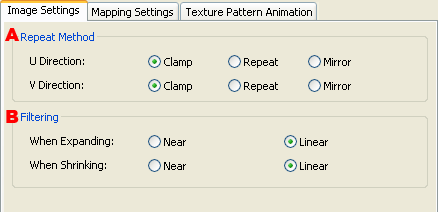
Sets the repeat method for the U (V) direction.
Clamping within the bounds of the image.
Simply repeats.
This can be selected only if the texture width (height) is a power of 2.
Repeats with mirroring.
This can be selected only if the texture width (height) is a power of 2.
Sets the filtering for when texels are reduced or magnified and then displayed.
Point sampling.
Bilinear filtering.
This is used to make settings related to texture mapping and the scaling, rotation, and translation of textures using a texture matrix.
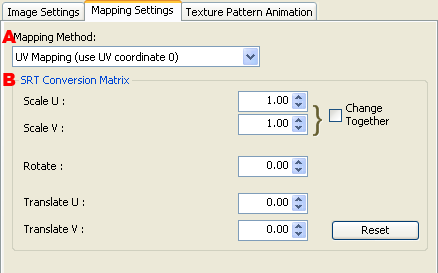
Select the number of the UV coordinate of the vertex used during UV mapping.
Sets the filtering for when texels are reduced or magnified and then displayed.
Sets the Scale value.
Specifies whether the U and V directions of the scale value are changed in unison.
Sets a Rotate value.
Sets a Translate value.
Resets the settings to the default.
Performs settings related to texture pattern animations.

Displays a list of registered textures.
The name of the texture.
The texture width.
The texture height.
The texture format.
Displays a list of textures registered for the texture pattern animation.
Represents the registration number of the texture.
The name of the texture.
Adds the textures selected on the registered texture list to the texture pattern list.
Deletes the textures selected on the texture pattern list.
Moves the textures selected on the texture pattern list to the top.
Moves the textures selected on the texture pattern list to the bottom.
Clears the texture pattern list.
Selects which textures to add from those registered to Texture Management.

Selects the texture to be used from the loaded textures.
Displays the format and size of the selected texture.
CONFIDENTIAL