Tool Environment Settings Dialog Box
Configures the tool environment settings
-
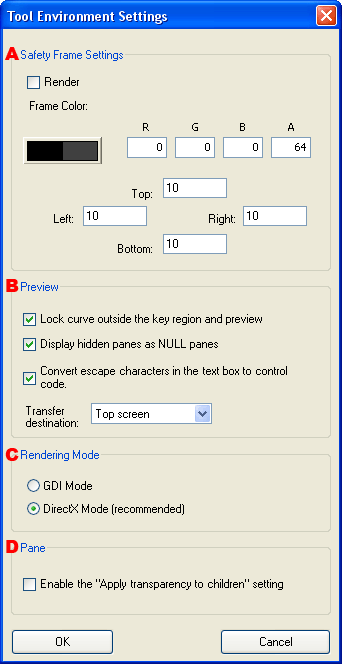
Configures settings for the safe frame.
- Draw
- Specifies whether to draw the safe frame guide indicating the region outside the safe frame.
- Frame color
- Specifies the color for drawing the safe frame guide. The color can be specified using the Color Picker Dialog Box.
- Top side, left side, right side, bottom side
- Specifies the width of the four sides of the safe frame guide.
-
Configures settings for preview operations.
- Previews using a fixed curve outside the key region
- Specifies whether to use fixed values to display segments of the animation curve for which keys have not been created.
- Displays hidden panes as null panes
-
Specifies whether to hide hidden panes or show them during preview with the Viewer.
If selected, hidden panes are treated as null panes in the Viewer, and only borders are displayed.
- Converts the escape characters in the text box to control code
-
Determine escape character strings from the character string information in the text box pane and then select whether to convert it to a particular control code.
- Send To:
-
Selects whether to send the data for previewing to the upper screen or to the lower screen when you execute Send to Viewer.
-
Rendering Mode
-
Sets the influence of pane transparency.
- Sets the default value for the pane property
Apply transparency to children.
CONFIDENTIAL