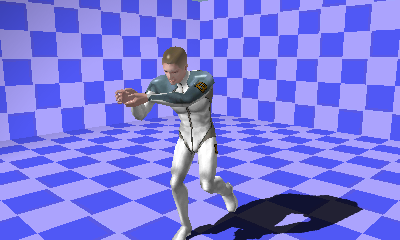
ProjectionShadowDemoDemo for applying shadows by projecting rendered results as a texture from the direction of the light.
Rendering is performed in two passes to achieve projected texture shadows.
In this demo, shadow settings are inserted by a callback using RenderCommand. This is set using the layer ID so that rendering is performed in the following order.
StartShadowRenderCommand → Render first pass → EndShadowRenderCommand → StartRenderCommand → Render second pass → EndRenderCommand
On the first pass, rendering is performed from the light direction toward the texture.
Beforehand, SHADOW_CASTER defined in the demo is set for objects that cast shadows in UserParameter.
On the first pass, a function object is set for SubmitView and only SHADOW_CASTER is added to the RenderQueue. Before rendering in the first pass, material settings for shadows are made using StartShadoRenderCommand.
StartShadowRenderCommand makes the following settings.
Switches to an offscreen buffer already created for rendering to textures.
Materials for shadows include the following settings.
- A shader that outputs vertex and color only
- A combiner that uses vertex shader output
- Invalidates the depth text
- Sets the shadow color (the diffuse color)
First, create a shadow camera pointed in the light direction.
Set using SetRenderMode so that material settings by the model are ignored.
This carries out rendering using the shadow settings set initially.
After models for which SHADOW_CASTER has been set, cancel shadow settings by calling EndShadowRenderCommand.
・Restore the regular render mode using SetRenderMode.
・Reset the state of RenderContext using ResetState.
Re-configure the active camera for SceneEnvironment because once the state is reset, active camera settings become invalid.
On the second pass, textures created in the first pass are applied to models that cast shadows and then rendered.
Shadow textures are set for models that cast shadows in the order given below.
In SampleData\Graphics\Intermediate\shadow_sample\male.cmdl, dummy.ctex has been attached to texture 0.
Projection mapping is applied to the dummy texture at this time.
Use SetTexture to dynamically switch to the created shadow texture.
CONFIDENTIAL