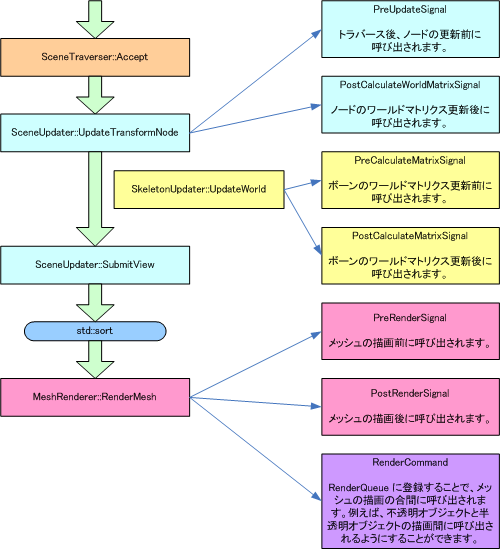
Rendering Order
When rendering models or other objects using NW4C, data is sorted at the level of meshes making up the model to determine the rendering order for each mesh.
The term mesh used above refers to the polygon sets that divide the model at the material level.
Use the following classes when sorting elements to be rendered.
RenderQueue stores render targets.
Specific Example of Controlling Rendering Order
Refer to the implementation of the following method in the demo library for information on how to control rendering order.
If you want a display equivalent to a render sort under CreativeStudio where mesh base is used for translucent objects and model base is used for opaque objects, set OPAQUE_MESH_BASE_AND_TRANSLUCENT_MODEL_BASE_SORT of nw::gfx::ISceneUpdater::RenderSortMode in nw::demo::RenderSystem::SetRenderSortMode.
Render Order Sort
To sort render targets, follow the procedure described below.
- Create RenderQueue and RenderKeyFactory
- Set
RenderKeyFactor for RenderQueue.
- Register render targets in RenderQueue.
- Sort the render targets in
RenderQueue using std::sort and RenderElementCompare.
Sort using std::sort or other sort algorithm using 64-bit integer values as keys for model sort. Use RenderElementCompare for key comparison during sort. Examples are shown below.
      std::sort(
          this->m_RenderQueue->Begin(),
          this->m_RenderQueue->End(),
          nw::gfx::RenderElementCompare());
You may also use a sort algorithm other than std::sort.
Keys Used for Sorting Render Targets
Keys used to determine rendering order are primarily created based on the following factors.
- Layer ID set by the programmer
- Render layer (translucency) of model data
- Material render priority of model data
- Material ID of model data
- Z depth in the screen coordinate system of the mesh
Keys used for sorting are created by packing the above information into a 64-bit integer value. The resulting integer value is called a render key.
The following types of embedded render keys have been prepared.
- PriorMaterialRenderKey
- Material priority render key.
- PriorMaterialReverseDepthRenderKey
- Render key for rendering from the back based on material priority.
- PriorDepthRenderKey
- Depth priority render key.
- PriorDepthReverseDepthRenderKey
- Render key for rendering from the back based on depth priority.
- TopPriorDepthRenderKey
- Depth priority render key.
- TopPriorDepthReverseDepthRenderKey
- Render key for rendering from the back based on top depth priority.
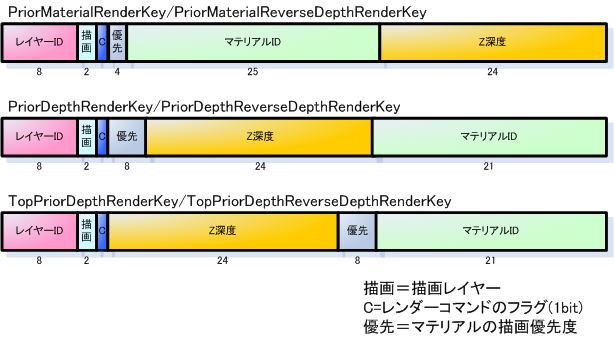
The bar figures represent a 64-bit integer value. Values below the above figures represent bit width.
Creating Render Keys
Use a sub-class of the BasicRenderKeyFactory to create keys. These are called render key factories.
Use the following function to create a render key factory class.
In addition to the above, you can also create your own key factory by inheriting the RenderKeyFactory class.
Set the key factory created for the RenderQueue using nw::gfx::BasicRenderQueue::Reset.
Interrupt Processes During Rendering
CONFIDENTIAL